How to create a website using WordPress/How to use plugins/No-code construction blog

Calendar booking, event bookingAmelia is a foreign-made WordPress reservation system plugin that supports
It is possible to set up multiple staff members and multiple services, such as beauty salon reservations, salon reservations, chiropractic/massage reservations, consultation/meeting reservations, school lesson reservations, and reservations for various events.
Reservations made manually via inquiry forms and phone calls can now be made
- Automatic confirmation email
- Cancellation Management
- Reminder email
- Follow-up email
- Zoom URL automatically generated
- Automatic payment via PayPal or Stripe
Many things can be solved by using the reservation management system Amelia, which solves the problems of labor costs and associated costs!
Creating an online salonAutomating bookings is a musttool!
For those who feel the need to make reservations in advance as face-to-face interactions become more common, or for business owners looking to reduce labor costs or other costs, we'd like to introduce Amelia, a reservation management system plugin that can immediately solve your problems!
Due to the many inquiries we have received about the WordPress reservation system plugin, we have decided to gradually release video explanations!
actuallyOur reservation system uses Ameliadoing!
Due to a major update to Amelia on December 22, 2025, the admin UI has changed significantly from the Amelia 9.x version.
This page provides the latest information after any changes.
If you are using an older version of Amelia 8.x or lower, please refer to this article.
What you can do with the WordPress reservation management system plugin Amelia
- Calendar booking
- Event booking
There are two ways to register: service type and event type. For service type, you can select a date from the calendar and make a reservation. For event type, you can receive reservations from the event list. Of course, you can also select events from the calendar!
How to set up the free version of the WordPress reservation management system plugin Amelia
Winter 2025 version! This explains how to set up Ameia's reservation system from scratch!
It feels like the free version is more limited than before... I recommend the paid version!
Plugin installation
setting
- basic configuration- Reservation time slot, reservation availability period, default phone number, country code, time zone, Amelia credit
→ (Charged) Reservation deadline, cancellation deadline, date change deadline, multilingual settings
- Company Information- Company basic information, business hours, and holiday settings
- payment- Set Japanese Yen, remove decimal point, set symbol (¥)
- reservation- Confirm reservation at the time of booking / tentative reservation setting. Accept reservations beyond the reservation limit, set a minimum number of people for reservations
→ (Paid) Reservations by service time frame, buffer display settings, selection of how to count the number of people booked, selection of employee allocation method
- notification- Email sender, sender email address, reply email address, administrator email forwarding settings
- authority- Check for duplicate customer registrations, and set administrator permissions for adding manual reservations
→ (Paid) Customer panel and employee panel available
staff
- How to add staff- Add staff, set email addresses, shifts, holidays, and special reservation days
Reservation Service
- How to add a booking service- Service category, service name, service duration, service price, and assigning services to staff
event
- How to add an event- Set the event date and time, price, number of people, reservation start date and time, reservation deadline date and time
notification
- Email notification settings when booking- Notification settings for emails sent to customers and staff when booking or canceling a service or event
→ (Paid) Date changes, reminders, follow-ups, birthdays, customer panel notifications
Reservation display
- Booking Calendar- Step-by-step calendar booking form. You can display only specific services, change the calendar color, text, and button design.
- Catalog Calendar- A reservation form that displays a reservation calendar after selecting a category. You can display only specific services, change the calendar color, text, and button design.
- Event Listing Form- A form for booking events. You can display only specific events, change the calendar color, text, button design, etc.
What you can do with the WordPress reservation management system plugin Amelia paid plan
We will introduce what you can do with the paid plan of the WordPress reservation management system plugin Amelia.
Click here for an explanation of the paid version license
→Explaining the six types of licenses for the paid version of the WordPress reservation management system Amelia
Features available in the paid version
Each license has different available features.
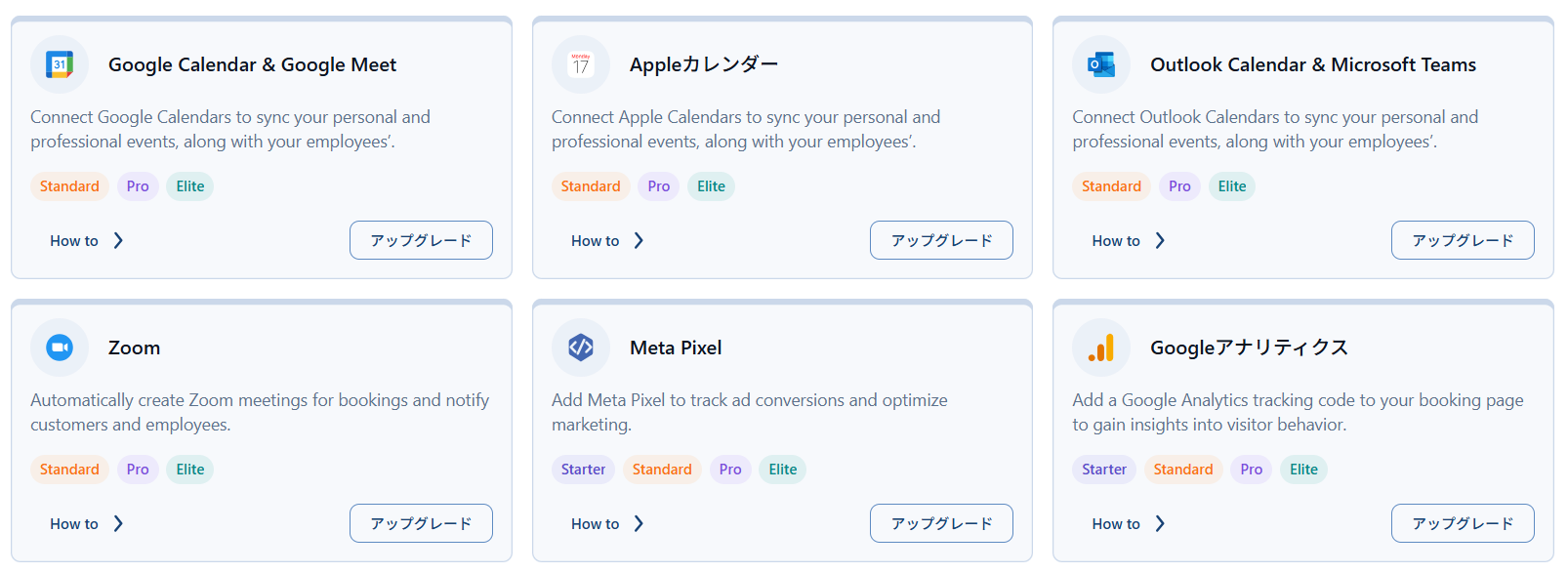
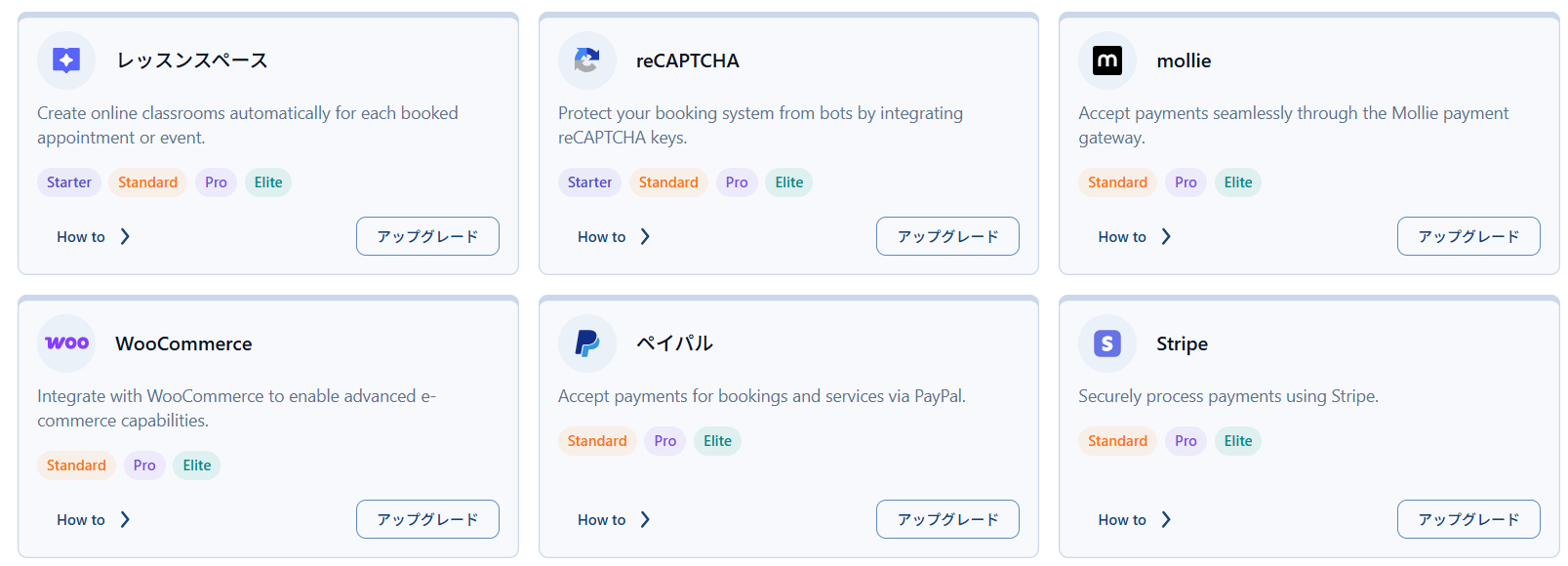
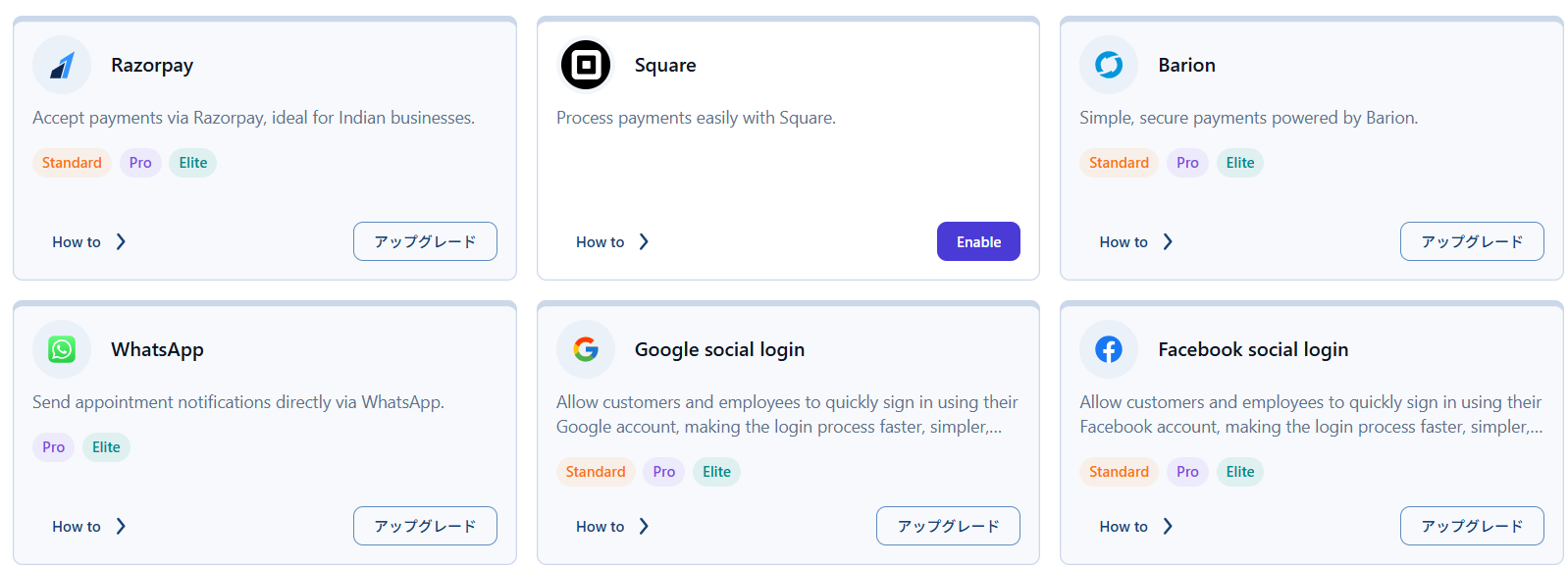

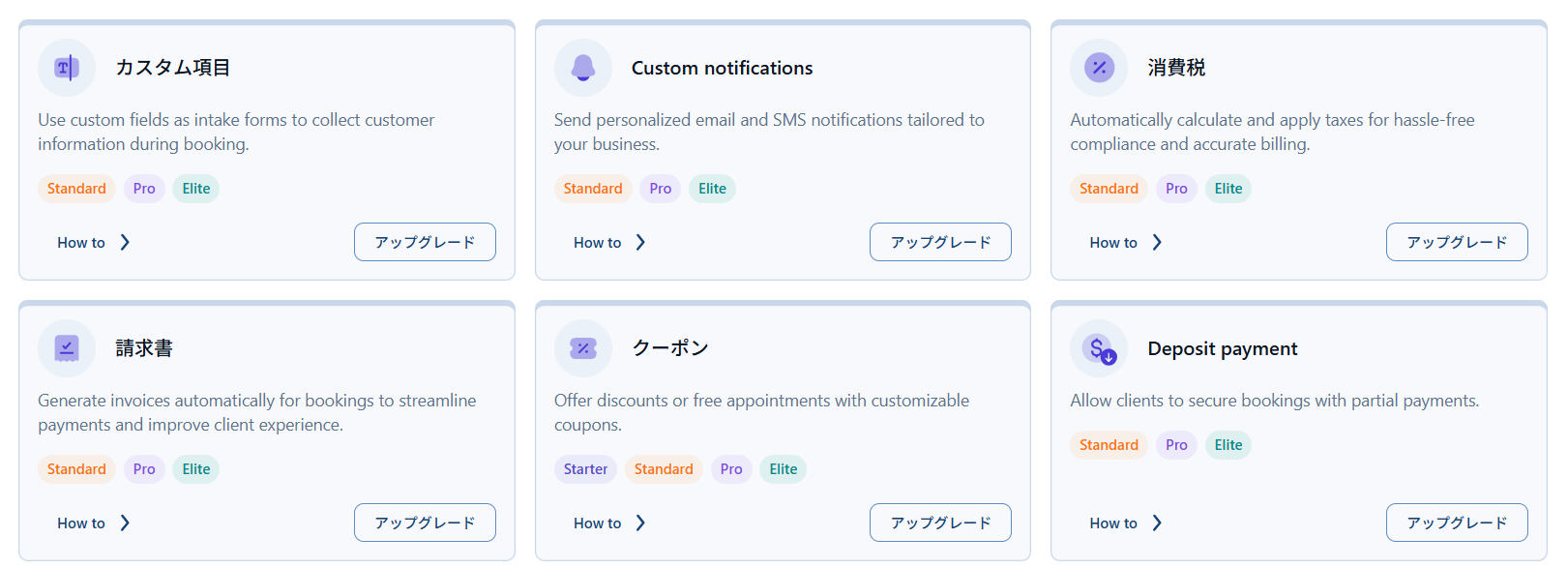
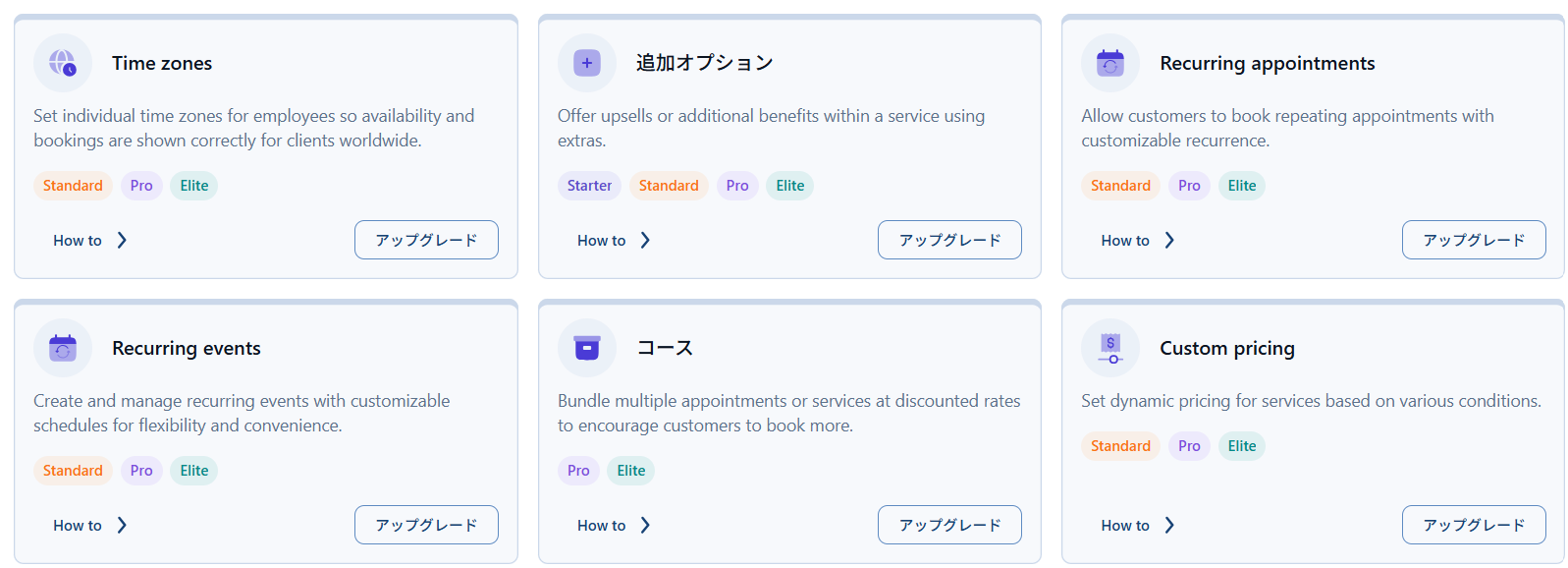
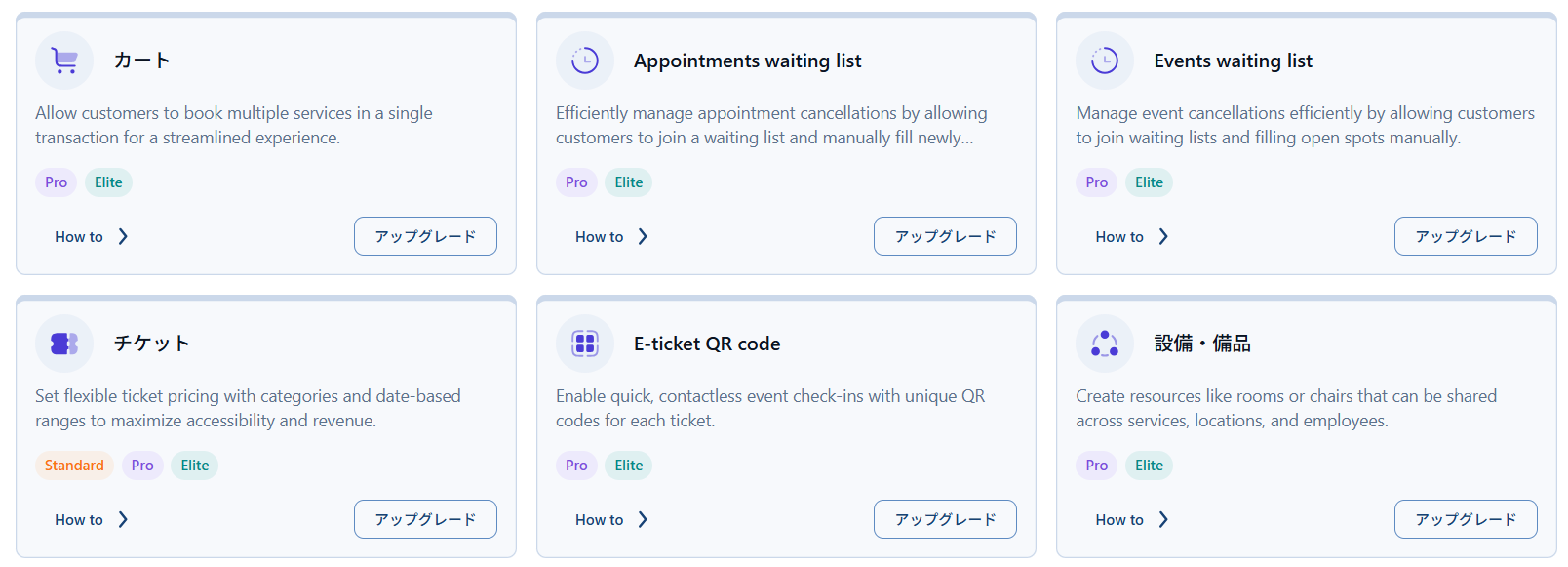
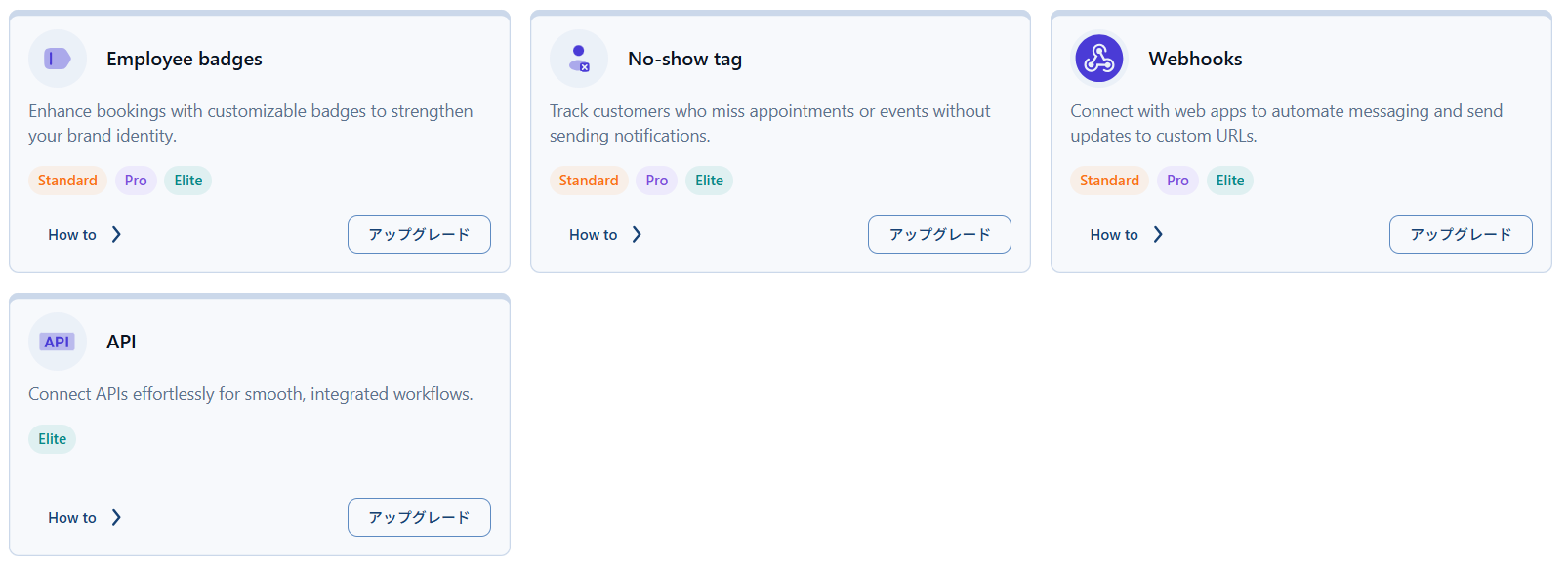
Amelia paid version features
We will introduce the features that will become available by paying a fee.
- Custom Fields- (Standard,Pro,Elite) You can add custom fields when booking. You can create two types of fields: fields associated with bookings and fields associated with customers.
- Custom Notifications-(Standard,Pro,Elite)You will be able to send emails for specific services and events at any time you like.
- consumption tax-(Standard,Pro,Elite)Sales tax settings
- invoice-(Standard,Pro,Elite)Explains whether to send an invoice when making a reservation and how to check the issued invoice
- coupon-(Starter,Standard,Pro,Elite)Issue a percentage or fixed amount discount coupon for a specific service or event. Expiration date and number of uses can be limited.
- deposit-(Standard,Pro,Elite)Set up a fixed amount or percentage deposit to be paid online at the time of booking
- Time Zone-(Standard,Pro,Elite)Ability to set time zones for employees living in multiple countries
- Additional options-(Starter,Standard,Pro,Elite)Add additional options to service bookings, including time and price settings
- Recurring service reservations-(Standard,Pro,Elite)Optional setting for recurring service reservations, allowing you to reserve multiple times at once.
- Repeating events-(Standard,Pro,Elite)Option to schedule the event to occur again.
- package-(Pro,Elite)Setting up a coupon ticket that allows multiple reservations for a service
- Custom Pricing-(Standard,Pro,Elite)Set prices for various service times, number of people, specific dates and days, and packages
- Cart function-(Pro,Elite)Ability to book multiple services in one booking
- Waiting list-(Pro,Elite)For reservations for group services of two or more people, you can be put on a waiting list.
- Event booking waiting
- ticket-(Standard,Pro,Elite)A function that allows you to set various prices for events. You can set different prices for adults and children, early bird discounts, and different prices by reservation date.
- QR code-(Pro,Elite) Automatically generate e-tickets (QR codes) for events
- Equipment/equipment-(Pro,Elite)Ability to control reservations for each equipment
- Employee badges-(Standard,Pro,Elite)A feature that allows employees to be badged to stand out
- No-show tag-(Standard,Pro,Elite)Ability to count customers who cancel without notice
- webhook
- API
Amelia paid version integration function
We will introduce the features that will become available by paying a fee.
- Google Calendar, Meet-(Standard,Pro,Elite)Google Calendar synchronization, automatic Google Meet URL generation
- Apple Calendar- (Standard,Pro,Elite)Integration with Apple Calendar
- Outlook Calendar, Teams(Standard,Pro,Elite) Outlook calendar, Teams URL automatic issuance
- zoom-(Standard,Pro,Elite) Zoom URL automatically generated
- meta pixel-(Standard,Pro,Elite) Track your reservations, packages, and events
- Google Analytics
- Lesson Space
- reCaptcha
- Mollie
- WooCommerce
- Paypal
- Stripe
- Square
- WhatApp
- Google Social Login
- Facebook Social Login
- MailChamp
- BuddyBoss
Amelia Updates
Due to the major changes to the admin screen specifications that came with the major update to Version 9.0 in December 2025, we have updated the explanation of Amelia.
Version 9.0 (December 22, 2025)
- One-click scheduling added – Add appointments and events directly from your calendar and have the date and time pre-filled with just a tap.
- Added Event Dashboard – A new tab in the dashboard provides analytics for events in addition to services, giving you deeper insights at a glance.
- Added Features and Integration page - Major UI changes to the admin screen to allow for feature and integration settings to be configured in one place
- Guides - Every admin page now includes a Tips and Suggestions section with links to documentation and best practices, providing one-click help
FAQ
Amelia's reservation is not reflected on Instabase
It seems that reservations from Amelia are not reflected on Instabase. Please refer to the following article for a solution!
Can I change the "Congratulations" message after the reservation is complete?
By using the translation plugin Loco Translate, you can freely change Japanese text, so it would be a good idea to translate it again.
I want to reverse the first and last names on the reservation form
Using the translation plugin Loco Translate, you can freely change Japanese text, so it's a good idea to translate the first name and last name in the opposite direction.
Can I use a ticket system?
If you purchase a Pro license, you can use the extended features of the service called a package. For example, this package can include six services for the price of five.
You can reserve it at the time of purchasing the package, but you can also reserve it at a later date via the customer panel.
It is also possible to set an expiration date for a package.
What happens if I cancel?
If you pay with PayPal or Stripe at the time of reservation, the operator will be charged a fee of 3.6% at that time. If the customer requests cancellation, it is possible to refund the payment from the PayPal or Stripe management screen.
You will receive a full refund, but the operator will pay a fee of 3.6%.
Many companies have terms of use that state things in advance, such as only accepting date changes or only refunding the amount minus a cancellation fee.
Can I only register one employee per email address?
For Gmail and Outlook, it is possible to register multiple employees to one email account by using a special registration method.
→Multiple email addresses with one email addressHow to add employees
Unable to connect to calendar
If you have performed Google sync using the integration but the employee settings display a message that says they cannot connect to the calendar, there may be old calendar connection information remaining in the database, causing a problem.
This can be resolved by deleting the relevant employee data in the [wp_amelia_providers_to_google_calendar] table in the database and re-registering it.
→Integration explanation pageI've added an explanation in.
Amelia E-learning course now open!
At HanamiWEB Online School,
●Ask questions in real-time in the virtual study room!
●Ask as many questions as you want via chat!
●E-learning materials that you can learn as much as you want, 24 hours a day!
All included for just 2,500 yen/month!
 English
  日本語
日本語