How to create a website using WordPress/How to use plugins/No-code construction blog




[2026 Latest] How to check the number of visits from generated AI using GA4's exploration function
At HanamiWEB Online School,
●Ask questions in real-time in the virtual study room!
●Ask as many questions as you want via chat!
●E-learning materials that you can learn as much as you want, 24 hours a day!
All included for just 2,500 yen/month!
In recent years, the number of users visiting websites via generative AI such as ChatGPT and Perplexity has been gradually increasing.
Therefore, in future web operations It is important to understand "how much traffic is coming from AI."is.
Generated AI traffic refers to website access generated by users via AI services such as ChatGPT and Perplexity.
Understanding the influx of generated AI content will provide valuable insights for developing content strategies in the coming age of AI search.
This article will explain how to use Google Analytics (GA4)How to verify access via generated AII will explain this from a practical standpoint.
AI-generated traffic can be checked under "Referrer".
GA4 does not have a dedicated inflow channel for generating AI.
Therefore, the verification method is simple We examine the source to identify traffic originating from AI services.
For example, the following domains:
- chatgpt.com
- perplexity.ai
- gemini.google.com
- copilot.microsoft.com
If these are displayed, We can conclude that traffic is being generated via AI.
We also explain it in a video!
Steps to verify AI-generated inflow using GA4, even for beginners.
The easiest way to actually verify this is to use the "Explore" function.
- Open the exploration report
- Create a blank report
- Add a dimension
- Add a metric
- Compile the report
- Searching for an influx of generative AI
- Check the landing page
① Open the exploration report
After logging into GA4, click "Explore" in the left menu.
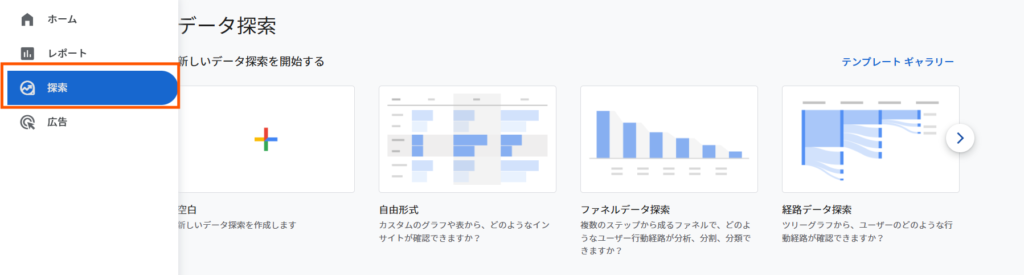
If you want to focus solely on generating AI, searching is a convenient method.
② Create a blank report
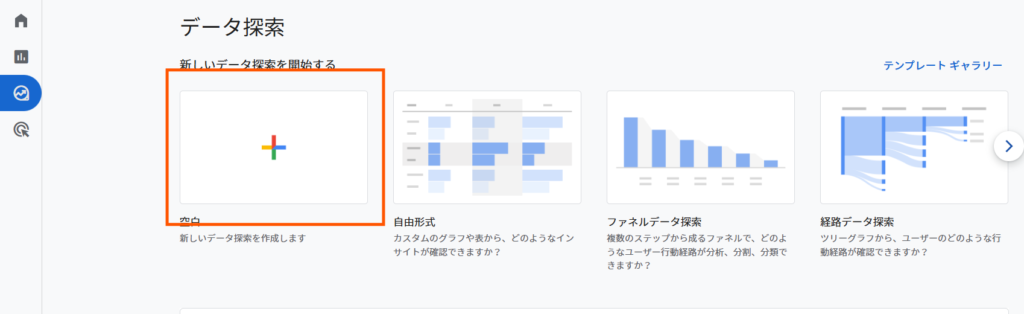
Select "Blank" from the template list.
From here, you will assemble your own analysis report.
③ Add a dimension
Add the following to "Dimensions":
- Session source / media
- Page location (or landing page)
This allows us to know "where you came from" and "which page you arrived on."
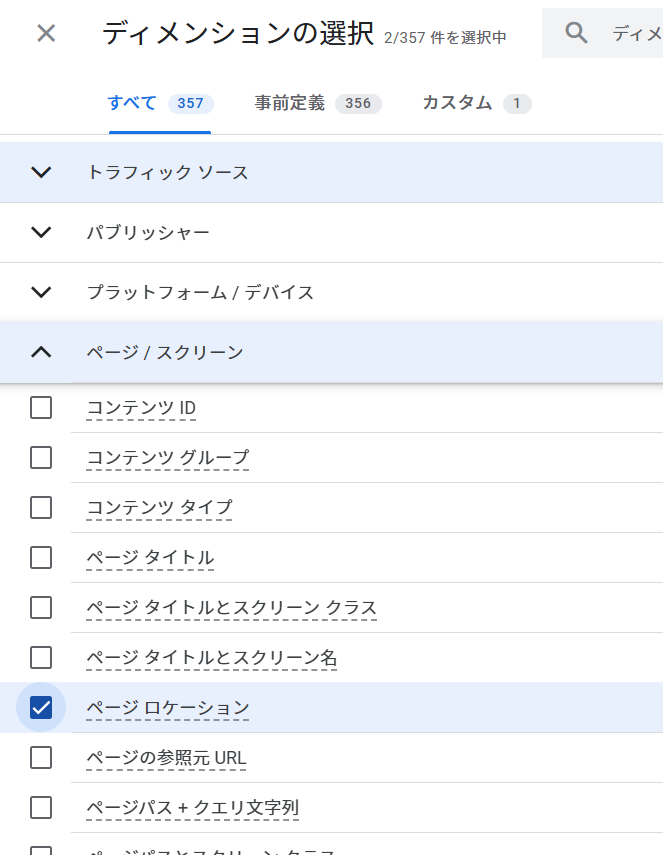
First, click the "+" icon for dimensions in the left sidebar.
From the menu that appears on the right
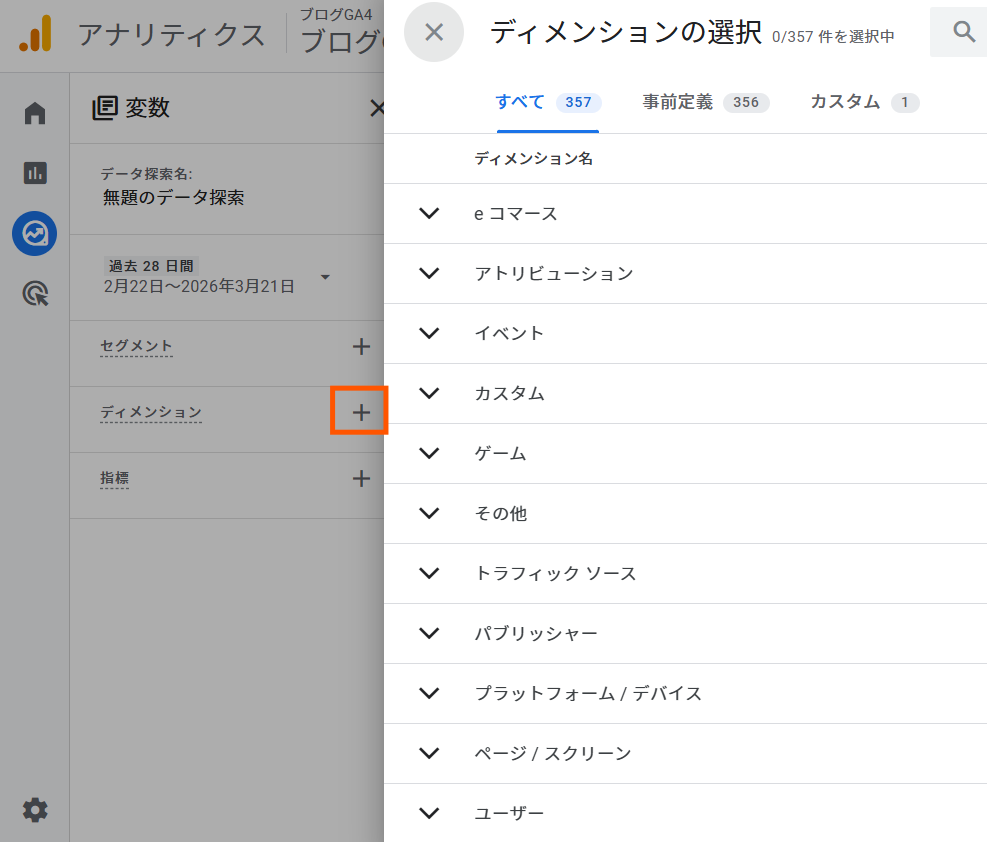
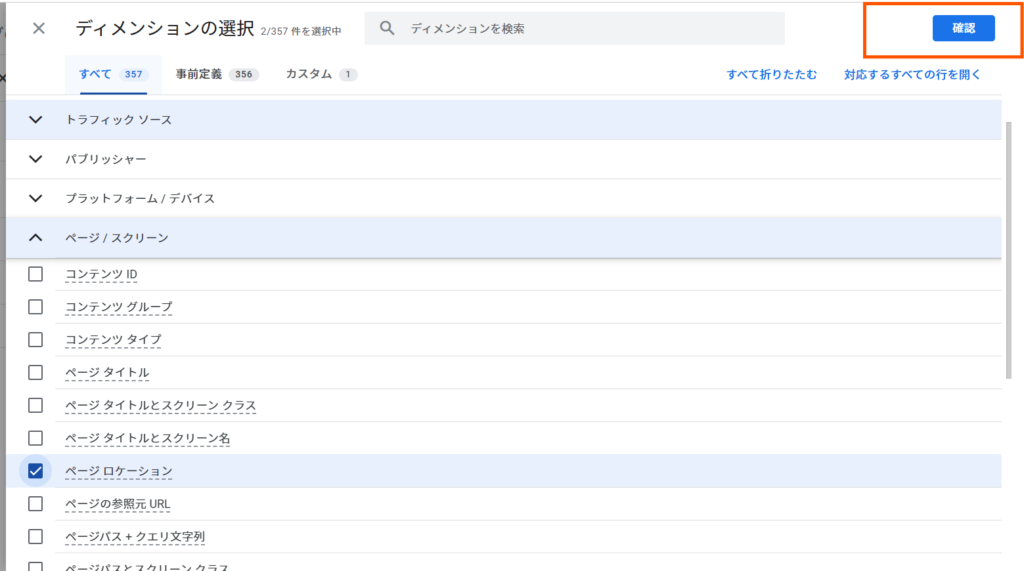
Check the box for "Session Source/Medium" under "Traffic Sources".
Check the "Page Location" option under "Page/Screen".
Finally, click the "Confirm" button.
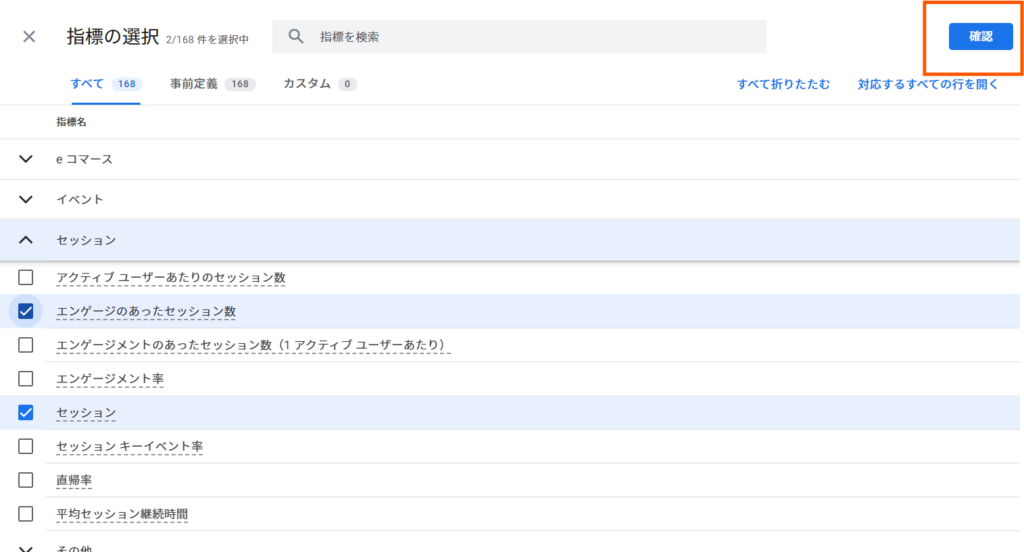
④ Add indicators
Next, add the following to "Metrics":
- session
- Number of engaged sessions
First, looking at the "Sessions" section will give you an overall picture of the number of visitors.
Click the "+" icon next to "Metrics" in the left-hand side menu to display the menu on the right.
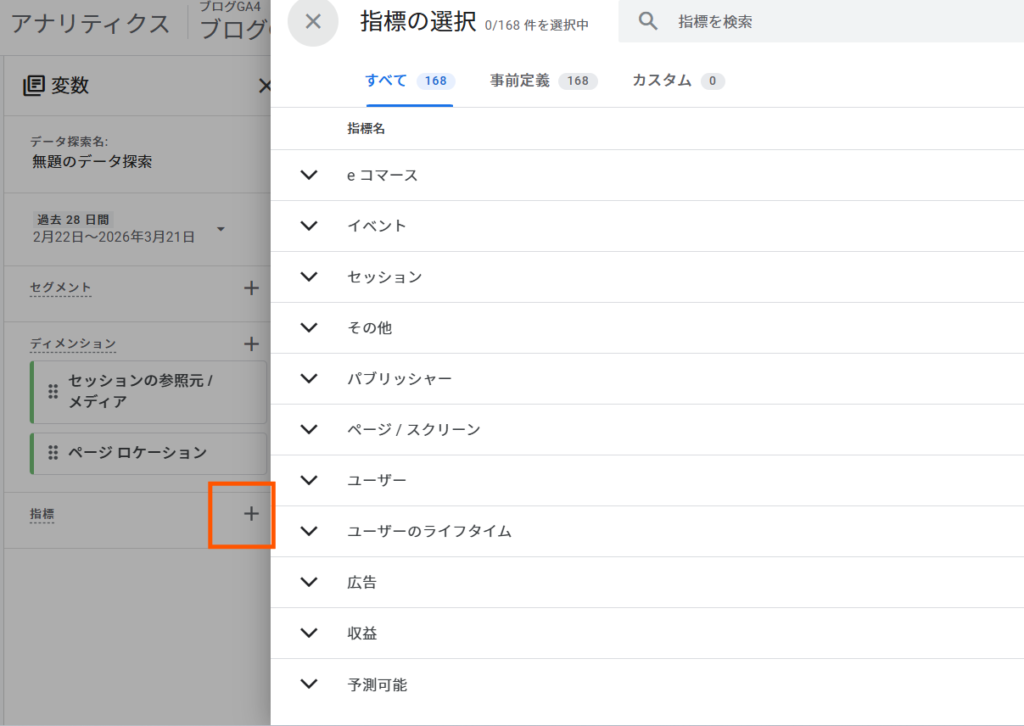
Inside the "session"
"Number of sessions with engagement"
"session"
Check the box.
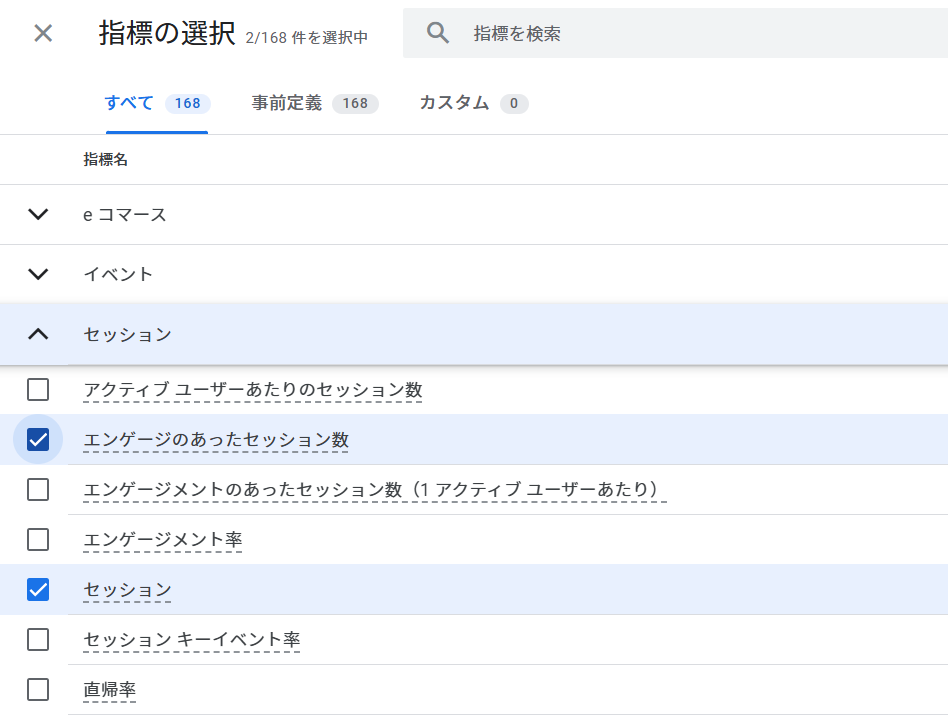
Finally, click the "Confirm" button.
⑤ Structure the report
In the settings area, configure the settings as follows:
- Column: Session source / media
- Row: Page Location
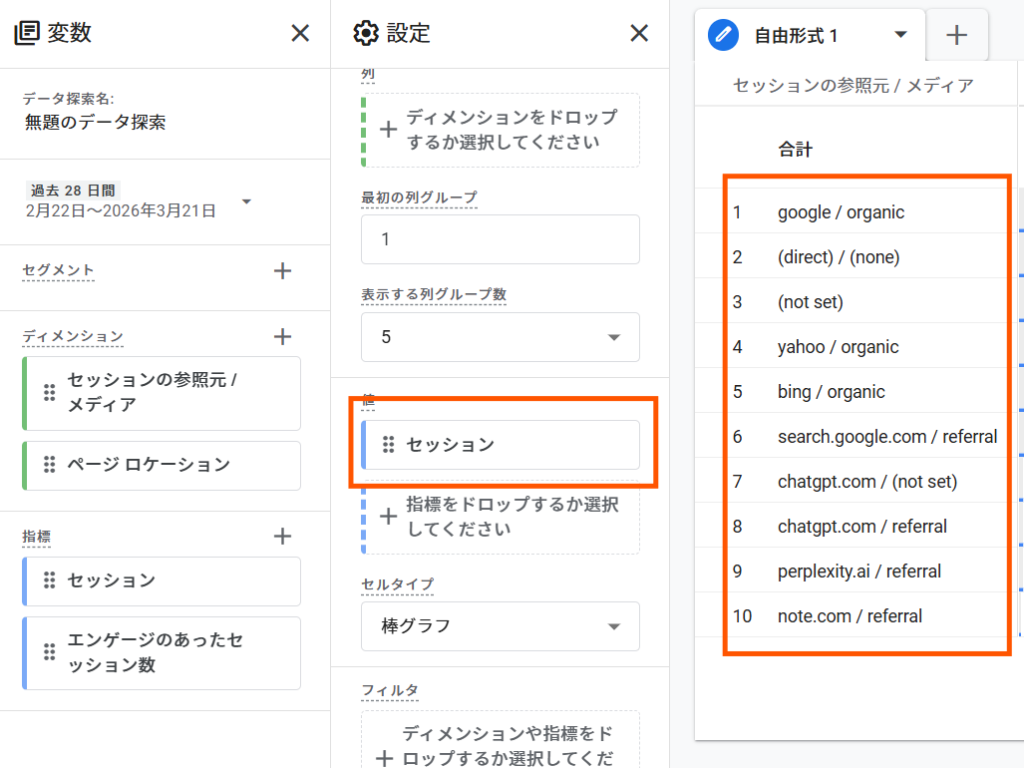
- Value: Session
This will display a list of traffic sources.
First, drag "Session Source/Media" to the right-hand column.
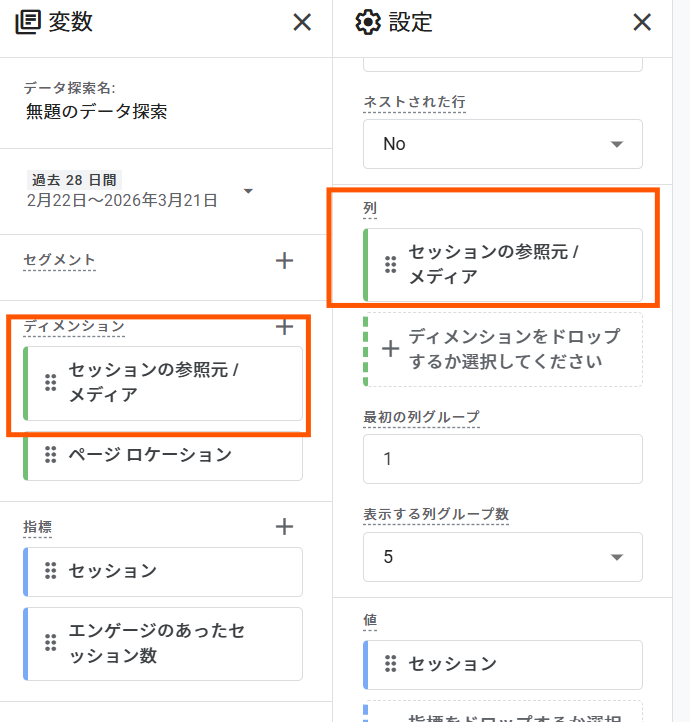
It will be set up like this.
Next, add "Page Location" to the row.
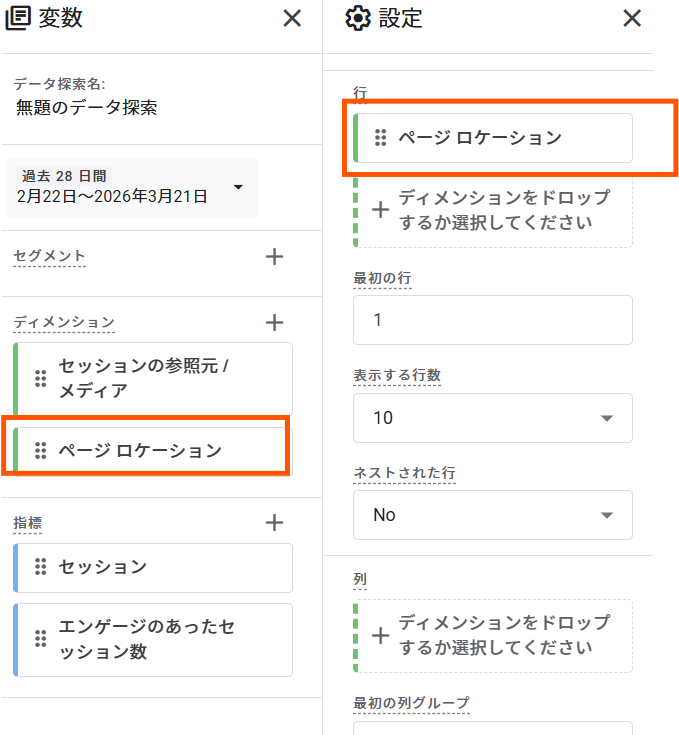
Finally, add the session to the value on the right.
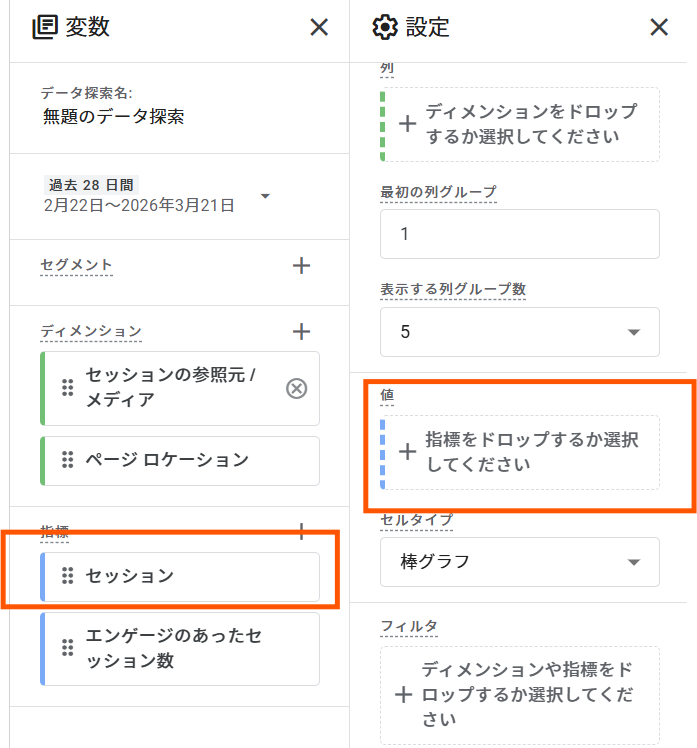
This is how it will be configured. At this stage, the table on the right will switch to a list of traffic sources.
From here on, we will focus solely on AI.
⑥ Search for an influx of generative AI
From the displayed list, find the following:
- chatgpt.com / referral
- perplexity.ai / referral
- gemini.google.com / referral
If it is displayedWe are already seeing traffic from AI.
Use the filter function to narrow down the results to only those generated by AI.
Select "Session Source/Media" in the filter.
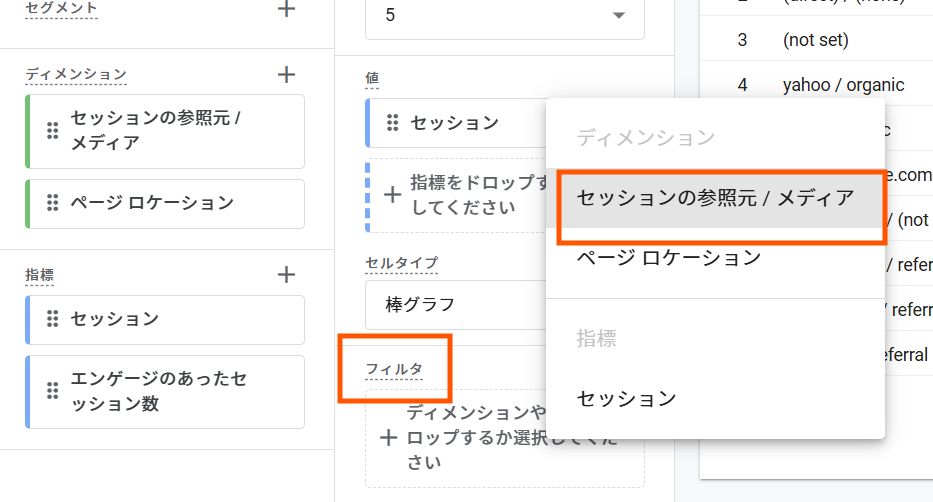
Select "Match the following regular expression" and add the following condition:
chatgpt\.com / referral|gemini\.google\.com / referral|perplexity\.ai / referral.*gpt.*|.*chatgpt.*|.*openai.*|.*neeva.*|.*writesonic.*|.*nimble.*|.*outrider.*|.*perplexity.*|.*google.*bard.*|.*bard.*|.*edgeservices.*|.*gemini.*google.*
⑦ Check the landing page.
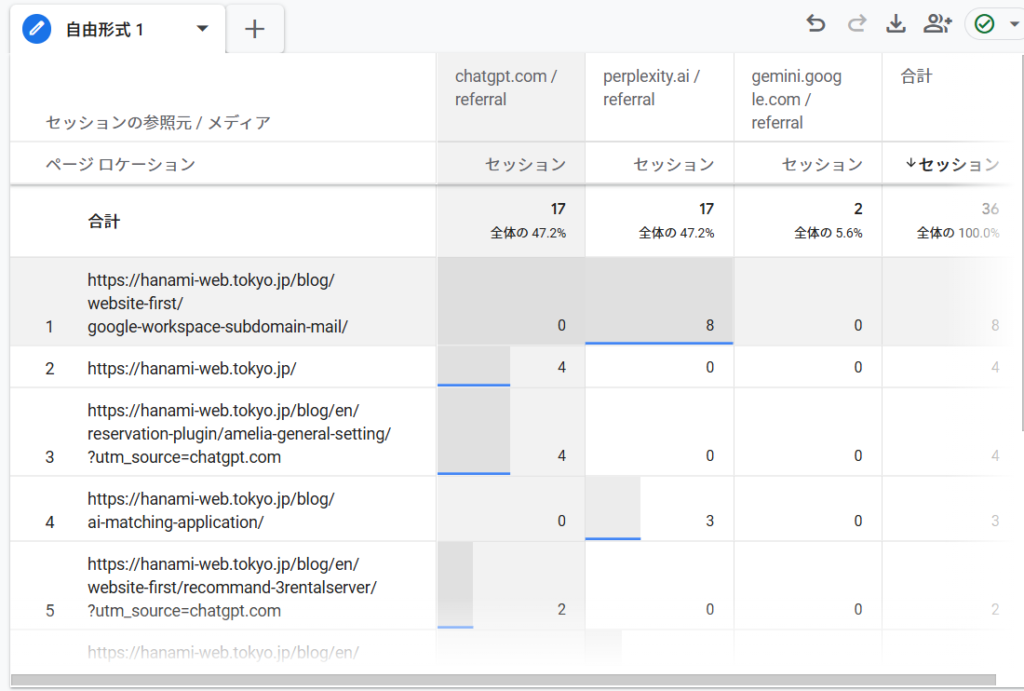
This
- Which articles are being cited by the AI?
- Which AI tools are using this?
You will understand.
Points I learned in practice
What I've noticed while actually running a blog is thatAI-generated content tends to be concentrated on specific articles.That's the point.
Articles like the following tend to attract more traffic:
- Instructional guide (How-to)
- Troubleshooting article
- Definitions and comparison articles
Conversely, articles that consist only of abstract content cannot be expected to attract much traffic from AI.
We need to re-evaluate how we've been writing articles for SEO purposes.
Points to note when checking AI traffic with GA4
There are several points to keep in mind when analyzing the influx of generated AI.
① Not all information can be obtained accurately.
Some access
- (direct) / (none)
- (not set)
It may be recorded as such.
ThereforeIt's important to "look at the trends" rather than looking at the exact numbers.
② AI influx is still small.
Currently, the number of visitors is often still lower compared to those from SEO.
However, this is an area that will definitely increase in the future, so it is worthwhile to understand it early on.
In fact, on this site, we have observed traffic to certain how-to articles via generated AI.
Future ways to use GA4
Once we can see the inflow of generated AI in GA4,
The following improvements will be possible:
- Strengthening articles picked up by AI
- Structuring articles with no traffic
- Adding FAQs
This will enable you to implement a PDCA cycle for LLMO countermeasures.
Summary of AI traffic measurement in GA4 report
GA4 does not have any analysis items specifically for generative AI, You can check for AI-driven traffic by looking at the source.
In particular, by using exploration reports,
- Which AI
- Which page
- How much is flowing in?
It is possible to understand this.
In future web operations, not only SEO but also"Whether it will be selected by AI" is also an important indicator.It will be.
FAQ regarding AI traffic measurement in GA4
Q. Can AI traffic be accurately measured with GA4?
A. While it's not possible to measure it perfectly, you can grasp the trend by looking at the source.
Q. Why does the influx of AI seem low?
A. This is because some access attempts are processed as direct or (not set).
Q. Which AI is generating the most traffic?
A. ChatGPT and Perplexity are the main sources of traffic.
Author/Administrator Information
This article was written by the representative of HanamiWEB, a company that provides web development and operation support, primarily using WordPress.
At HanamiWEB,
- Building a WordPress site
- Web marketing support
We support companies' online strategies through these and other means.
Based on the knowledge gained in practical work,We share practical know-how that can be used in the field.
Other methods for measuring AI traffic using GA4
You can also check the number of AI-generated visits under "Customer Acquisition > Traffic Acquisition." Please refer to this blog post for instructions on how to check!
▶(Latest 2026) How to check AI traffic with GA4
Released as soon as the next morning! Weekends and holidays are also available!
Super rush website creation plan
We offer a rush website creation plan for those who need a website in a hurry!
We can publish your content as soon as the next morning, even on weekends and holidays! If you have any questions, please check the details below!

Latest Articles

How to Enhance EEAT with WordPress | Settings and Design Improvements Necessary for AI-Driven Traffic


[2026 Latest] How to check the number of visits from generated AI using GA4's exploration function

Error message: Allowed memory size of 268435456 bytes exhausted (tried to allocate 14684160 bytes) Error: On Lollipop
 English
  日本語
日本語