How to create a website using WordPress/How to use plugins/No-code construction blog




Create a Terms of Use page with SliceWP, which allows you to implement your own affiliate program
At HanamiWEB Online School,
●Ask questions in real-time in the virtual study room!
●Ask as many questions as you want via chat!
●E-learning materials that you can learn as much as you want, 24 hours a day!
All included for just 2,500 yen/month!
If you want to implement your own affiliate referral system on your own website, you can do so using the WordPress plugin SliceWP.
Since you will need to enter into an affiliate agreement, a terms of use page is required.
Create a new static page
Create a terms of use page by creating a new static page.
Link with SliceWP settings
- SliceWP
- Settings
- General
- Pages Settings
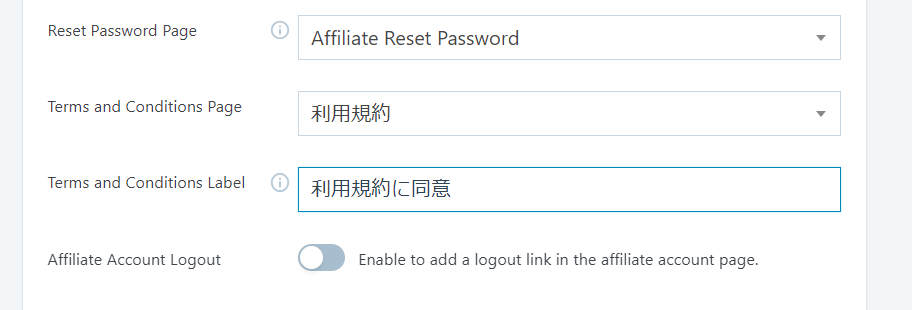
- Terms and Conditions Page – Select the terms of use page you created
- Terms and Condition Label - Add text to display
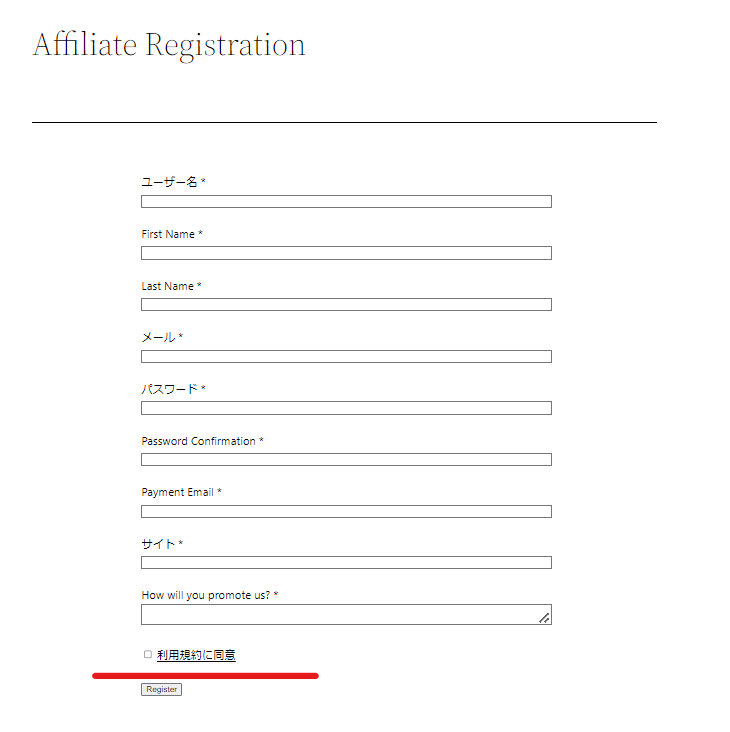
The terms and conditions will be added to the affiliate registration form.

We are available on weekends and holidays!
Please contact us if you have any problems with your website!

- Unable to log in to WordPress
Malware infection?
- The homepage suddenly stopped displaying!
- A PHP error is occurring.
We also offer support on weekends and holidays for those who need assistance.
If you are in a hurry, please call us now at 03-6694-7024.
Latest Articles


Timing and Process for Renewing Your Recruitment Website | Key Points to Review to Increase the Number of Applications

7 Key Points for Creating a Recruitment Website | How to Create a Recruitment Site That Job Seekers Will Choose
What is the average cost of a recruitment website? A thorough explanation of pricing by production method.
 English
  日本語
日本語