How to create a website using WordPress/How to use plugins/No-code construction blog



[Anti-Fraudulent Login Prevention] Is your WordPress user ID visible to external parties? We explain how to check and security measures to hide your user ID!
At HanamiWEB Online School,
●Ask questions in real-time in the virtual study room!
●Ask as many questions as you want via chat!
●E-learning materials that you can learn as much as you want, 24 hours a day!
All included for just 2,500 yen/month!
Recently, we've been receiving an increasing number of inquiries about unauthorized access to WordPress sites and malware infections.
In addition to attacks targeting vulnerabilities in WordPress itself and its plugins, "brute-force attacks," which repeatedly try user IDs and passwords on the login screen, are also not uncommon.
Therefore, I would like to ask those of you using WordPress to check the following:
"Is my WordPress user information visible to external parties?"
That's the point.
In fact, depending on the settings, WordPress can sometimes allow third parties who are not logged in to access user information through the REST API or other means.
Can I see WordPress user information?
WordPress has a mechanism called "REST API".
This is a convenient mechanism used for integrating with external services and for internal WordPress functions, but by default, user information can sometimes be retrieved from URLs like the following.
https://domain/wp-json/wp/v2/usersEven on the official WordPress website,GET /wp/v2/users This is provided as a REST API for retrieving a list of users.
Depending on your environment, accessing this page may result in...
- User display name
- user slug
- URL of the poster's page
These will be displayed.
The password itself is not displayed.
However, if the username used for logging in, or any information that could be used to guess it, is accessible from the outside, it can become a tool for attackers to launch login attacks.
First, check your own website!
Try accessing the following URL while you are not logged into WordPress, such as in your browser's incognito mode.
https://domain/wp-json/wp/v2/usersfor example,
https://sample.com/wp-json/wp/v2/usersis.
If user information is displayed here, it's possible that third parties could also access the same information.
Furthermore, WordPress has a feature called "author archives."
for example,
https://sample.com/?author=1When you access a URL like this,
https://sample.com/author/usernameIn some cases, users are redirected to URLs like this, allowing the user to be inferred.
Even in the official WordPress documentation, the author page is... user_nicename The system is designed so that URLs using this feature exist.
Knowing the user ID does not automatically mean that unauthorized logins will occur.
This is a point that is easily misunderstood.
Knowing the username doesn't automatically mean you can log into WordPress.
A password is required to log in.
however,
Username + Password
From a situation where you had to guess both of these,
All you need to do is guess the password.
It will get closer to that.
Therefore, we recommend that you avoid disclosing unnecessary user information as much as possible.
If you want to implement a solution without using a plugin
In WordPress, completely disabling the REST API itself is not recommended.
Since the REST API is used by the WordPress admin panel and plugins, disabling it completely could affect other functions.
WordPress officially provides guidance on how to restrict access to the REST API as needed, rather than disabling the REST API altogether.
If you want to prevent external access to user information only, then the theme functions.php You can restrict access to user-related REST APIs using custom plugins or other methods.
for example rest_endpoints Using a filter,
/wp/v2/users/wp/v2/users/(?P [\d]+)
There are ways to prevent user-related endpoints such as these from being exposed externally.
However, directly editing the theme's functions.php file may result in the changes being lost during theme updates, or the site becoming inaccessible due to coding errors.
Therefore, if you are not familiar with WordPress, it is recommended to use a security plugin.
In the case of All-In-One Security (AIOS)
"All-In-One Security (AIOS)" includes a feature to prevent user enumeration.
From the WordPress admin screen,
WP Security
→ User Security
→ User number disabled
Go to:
Turn on "Disable user enumeration".
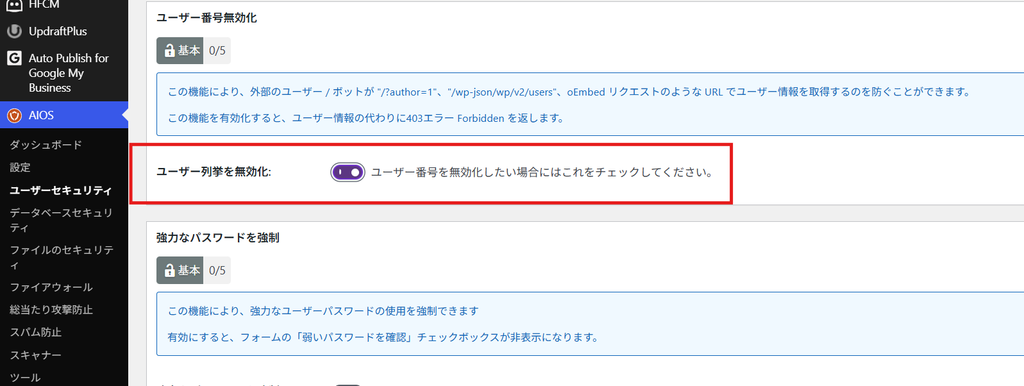
After making the changes, be sure to log out of WordPress.
https://sample.com/wp-json/wp/v2/usersPlease try accessing it.
Check if the user list is no longer displayed.
Also,
https://sample.com/?author=1https://sample.com/?author=2It's a good idea to check these points as well.
If you are using Wordfence
If you are using the WordPress security plugin "Wordfence," there are settings available to prevent username discovery.
From the WordPress admin screen,
Wordfence
→ Firewall
→ Brute-force protection management
Go to:
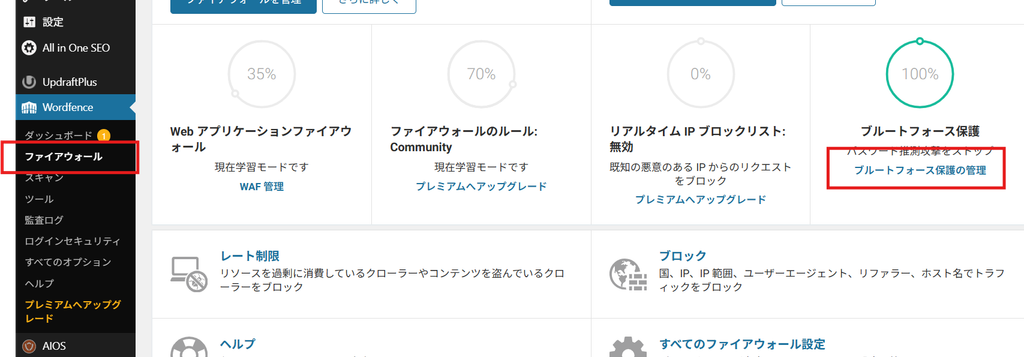
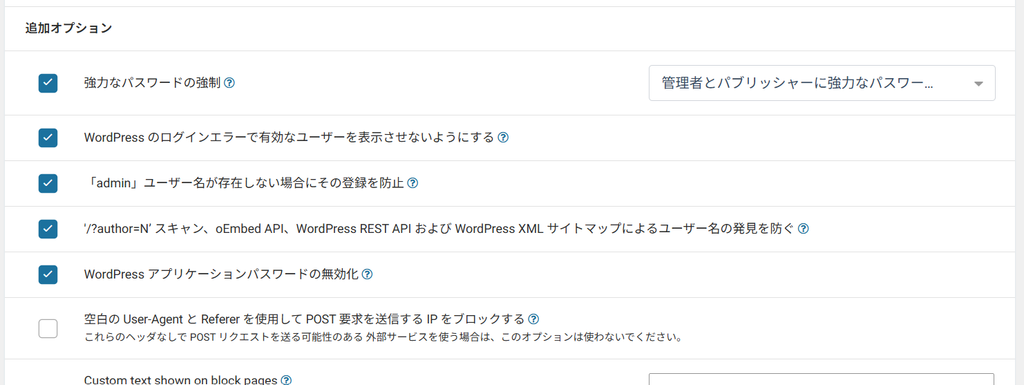
Please check the section for additional options within that document.
Prevent username discovery via /?author=N scans, oEmbed API, WordPress REST API, and WordPress XML sitemaps.
Please make sure that the checkbox is checked. It was checked by default, so currently, once you install Wordfence, your user ID will be automatically protected.
/?author=1
This includes methods of searching for users using poster IDs,
/wp-json/wp/v2/users
This measure prevents the acquisition of user information using methods such as [mention specific methods/technologies].
Be sure to check after setting it up.
Once you've enabled the settings, log out of WordPress or open your browser's incognito mode.
https://yourdomain/wp-json/wp/v2/usersI will try accessing it.
Please check if user information can no longer be retrieved from websites where it was previously displayed before the changes were made.
In addition,
https://yourdomain/?author=1https://yourdomain/?author=2It's a good idea to check these things as well for peace of mind.
Wordfence can also provide protection against login attacks.
When using Wordfence, it is recommended not only to hide usernames but also to set limits on the number of login attempts.
same
Wordfence
→ Firewall
→ Brute-force protection management
Among them,
- How many failed login attempts will result in a lockout?
- How many times can I be locked out if I forget my password?
- How long should the user be locked?
You can configure these settings.
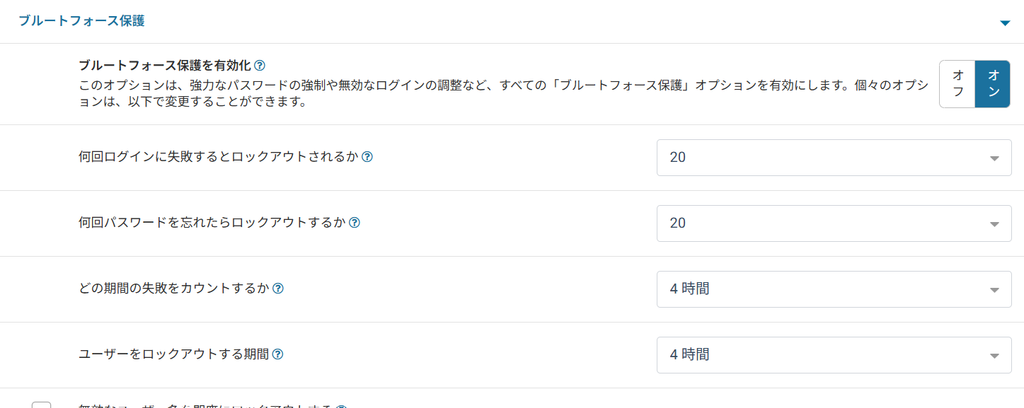
Combining measures to prevent usernames from being obtained with measures to restrict actual login attempts can enhance security.
Furthermore, Wordfence also offers two-factor authentication (2FA).
It is important to combine strong passwords, login attempt limits, and two-factor authentication.
Blocking only the REST API is not enough to ensure security.
User ID protection alone is not enough to complete WordPress security measures.
The following measures are especially important.
- Keep WordPress core up to date
- Keep your plugins and themes up to date.
- Remove unused plugins.
- Use a strong, unique password.
- Limit the number of login attempts
- Set up two-factor authentication
- Take backups regularly.
- Check for suspicious file changes and login history.
Hiding user IDs is not a way to completely prevent intrusion, but rather one measure to reduce the amount of information given to attackers.
A critical vulnerability has also been reported in the WordPress core.
In September 2026, a critical vulnerability known as "CVE-2026-87902" was publicly disclosed in the WordPress core.
The affected versions are WordPress 4.7.0 through 7.1.1, and in environments where the conditions are met, an attack by an unlogged third party could lead to arbitrary code execution.
This issue was fixed in WordPress 7.1.2, and corrected versions have also been released for earlier versions.
Don't assume everything is fine just because you have automatic updates enabled; we recommend checking the current version from the WordPress admin panel.
Recently, attacks on WordPress have been increasing.
When checking the login history for WordPress, you may find cases where "multiple login attempts are being made using your username from an unknown IP address."
Seeing such a history might make you worry, "Could my ID have been leaked from my computer?"
However, in some cases, user information is obtained from the WordPress site itself, and an automated bot attempts to log in based on that information.
First,"/wp-json/wp/v2/usersPlease check the following.
Your user information may be more easily accessible from the outside than you realize.
WordPress security is,Instead of "treating the infection after it occurs," the focus should be on "creating a state that makes it difficult for the virus to invade."This is important.
The checks I've described only take a few minutes, so if you're running a WordPress site, please give them a try.
For those experiencing problems with unauthorized access or malware infections on their WordPress site.
WordPress is a convenient CMS, but because it has so many users, it is often a target for attacks such as unauthorized logins and malware infections.
"The website suddenly stopped displaying."
"A large number of pages I don't recognize have been created."
"There is a suspicious login history."
"I've been infected with a virus/malware."
When such problems occur, prompt action is crucial.
At HanamiWEB,WordPress bug fixes, malware infection recovery, and security measures.We are currently working on the following.
Furthermore, not only does it involve responding to problems after they occur,
- WordPress core and plugin updates
- Security check
- Response when a problem occurs
- Routine site management
Includes, etc.WordPress site maintenance serviceWe also have that available.
We provide support even on weekends and holidays in case of emergencies such as "I think I've been infected with a virus" or "The website suddenly started malfunctioning."
If you have concerns about managing WordPress, or if you find it difficult to maintain security management on your own, please feel free to contact us.
Learn more about WordPress modification and maintenance services here. →

We are available on weekends and holidays!
Please contact us if you have any problems with your website!
- Unable to log in to WordPress
Malware infection?
- The homepage suddenly stopped displaying!
- A PHP error is occurring.
We also offer support on weekends and holidays for those who need assistance.
If you are in a hurry, please call us now at 03-6694-7024.
Latest Articles
[Anti-Fraudulent Login Prevention] Is your WordPress user ID visible to external parties? We explain how to check and security measures to hide your user ID!
Timing and Process for Renewing Your Recruitment Website | Key Points to Review to Increase the Number of Applications
7 Key Points for Creating a Recruitment Website | How to Create a Recruitment Site That Job Seekers Will Choose
 English
  日本語
日本語