How to create a website using WordPress/How to use plugins/No-code construction blog



I want to switch WordPress editors!
At HanamiWEB Online School,
●Ask questions in real-time in the virtual study room!
●Ask as many questions as you want via chat!
●E-learning materials that you can learn as much as you want, 24 hours a day!
All included for just 2,500 yen/month!
[word_balloon id="3" position="L" size="M" balloon="talk" name_position="under_avatar" radius="true" avatar_border="false" avatar_shadow="false" balloon_shadow="true" avatar_hide="false"]The posting screen for WordPress has changed due to an update. [/word_balloon]
[word_balloon id="1" position="R" size="M" balloon="talk" name_position="under_avatar" radius="true" avatar_border="false" avatar_shadow="false" balloon_shadow="true" avatar_hide="false"]It is called the block editor, and is the editor that comes standard with WordPress 5.0 and later.[/word_balloon]
[word_balloon id="3" position="L" size="M" balloon="talk" name_position="under_avatar" radius="true" avatar_border="false" avatar_shadow="false" balloon_shadow="true" avatar_hide="false"]It's hard to use, can you change it to the one I used before? [/word_balloon]
[word_balloon id="1" position="R" size="M" balloon="talk" name_position="under_avatar" radius="true" avatar_border="false" avatar_shadow="false" balloon_shadow="true" avatar_hide="false"]The previous version is called Classic Editor. You can easily revert back to the previous version! [/word_balloon]
[word_balloon id="3" position="L" size="M" balloon="talk" name_position="under_avatar" radius="true" avatar_border="false" avatar_shadow="false" balloon_shadow="true" avatar_hide="false"]Please let us know!! [/word_balloon]
[word_balloon id="1" position="R" size="M" balloon="talk" name_position="under_avatar" radius="true" avatar_border="false" avatar_shadow="false" balloon_shadow="true" avatar_hide="false"]Great. Let's take a look! [/word_balloon]
What is the WordPress text editor?
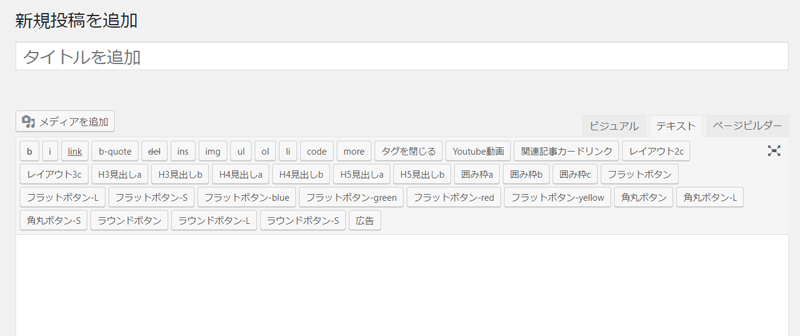
This type of text input screen is called the classic editor.
Plugins > Add New > Classic Editor
https://ja.wordpress.org/plugins/classic-editor/
You can install the plugin above.
For it
What is the WordPress block editor?
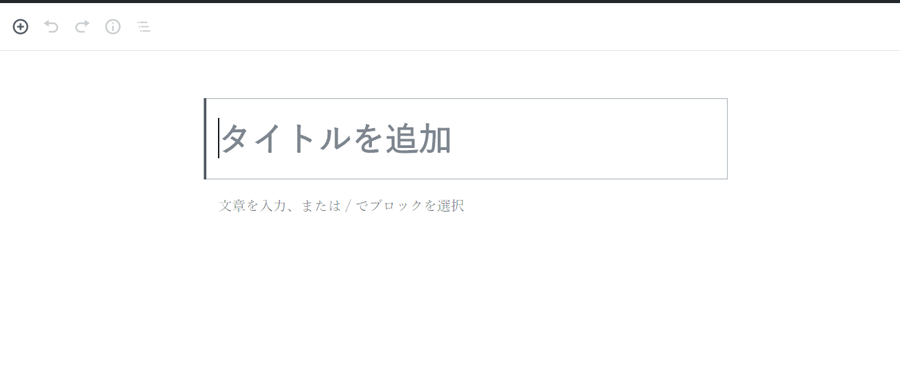
This type of text input screen is called a block editor.
The block editor is a standard text input editor.
You can easily switch between these two editors.
How to switch between classic and block editor in wordpress
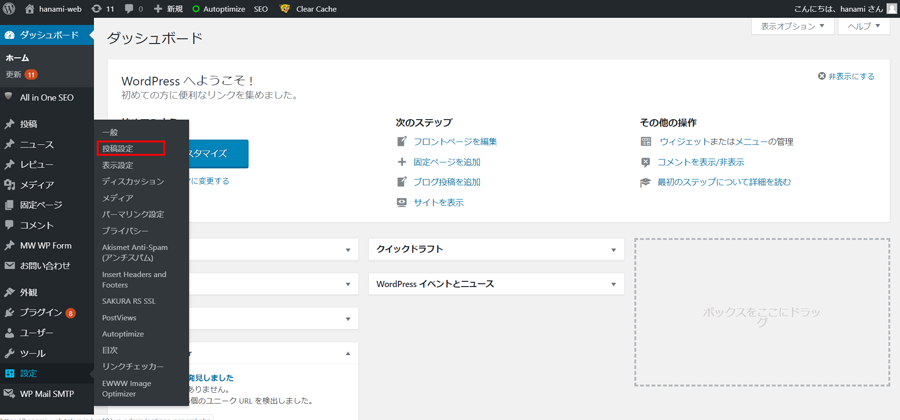
Dashboard Settings > Posting Settings
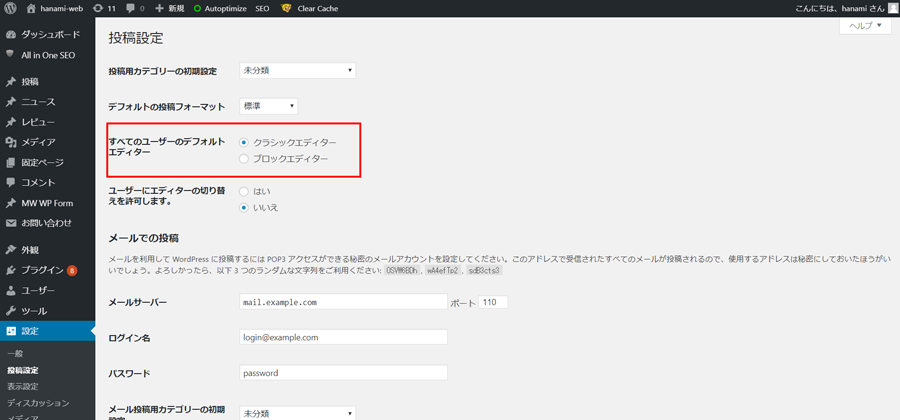
You can select the target area.
lastly
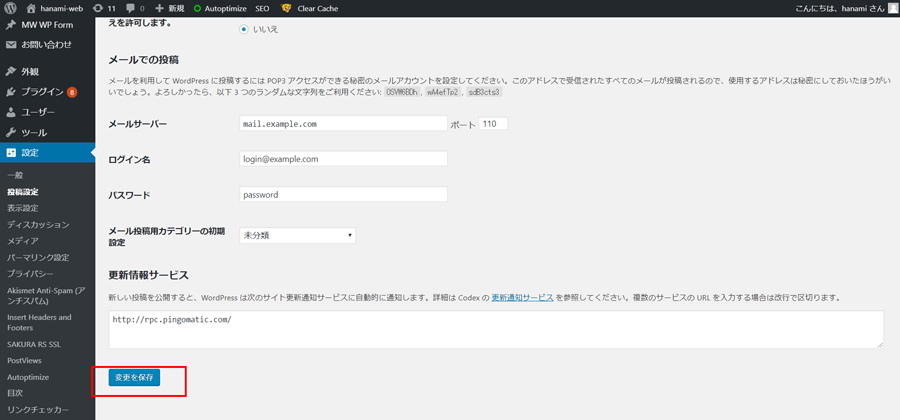
Be sure to click Save!
Anyone can easily switch between the WordPress classic editor and the block editor.
[word_balloon id="1" position="L" size="M" balloon="talk" name_position="under_avatar" radius="true" avatar_border="false" avatar_shadow="false" balloon_shadow="true" avatar_hide="false"]If you have any questions that you cannot solve on your own, please ask them on Coconala[/word_balloon]
Please feel free to use it.

We are available on weekends and holidays!
Please contact us if you have any problems with your website!

- Unable to log in to WordPress
Malware infection?
- The homepage suddenly stopped displaying!
- A PHP error is occurring.
We also offer support on weekends and holidays for those who need assistance.
If you are in a hurry, please call us now at 03-6694-7024.
Latest Articles


Timing and Process for Renewing Your Recruitment Website | Key Points to Review to Increase the Number of Applications

7 Key Points for Creating a Recruitment Website | How to Create a Recruitment Site That Job Seekers Will Choose
What is the average cost of a recruitment website? A thorough explanation of pricing by production method.
 English
  日本語
日本語