How to create a website using WordPress/How to use plugins/No-code construction blog



Explains how to set advanced overall conditions before taking a course using the LMS plugin TutorLMS
At HanamiWEB Online School,
●Ask questions in real-time in the virtual study room!
●Ask as many questions as you want via chat!
●E-learning materials that you can learn as much as you want, 24 hours a day!
All included for just 2,500 yen/month!
I am researching LMS plugins to create an e-learning system using WordPress. I am introducing the paid version of the TutorLMS plugin. Since I want to create a full-fledged system, I am comparing the features of the paid version.
This time, we will explain how to set prerequisites for taking a course as an action, which is a feature of the paid version of TutorLMS.
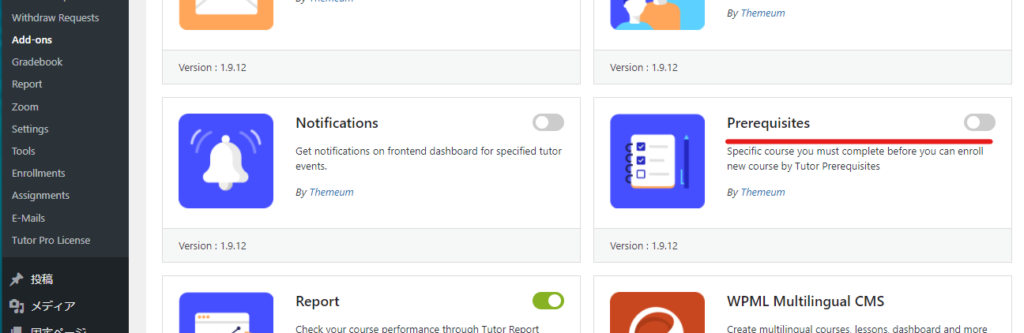
Course Prerequisites Extension Added
- TutorLMS
- Add-ons
- Perewuisites
Turn it ON.
How to add prerequisites to a course
Operate on the editing screen of the course you want to set.
- TutorLMS
- Coueses
- Open the editing screen for the course you want to edit or create a new one.
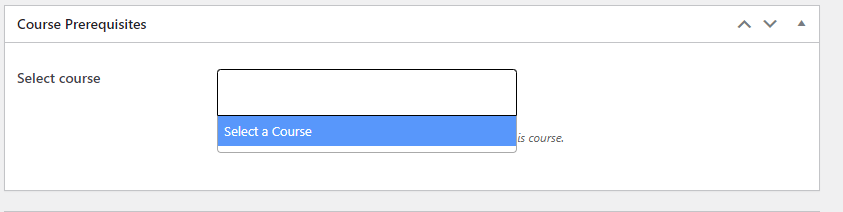
- Course Perequisites
In this section, set the courses that must be completed before the course you are setting.
Content prerequisites for similar functionality
There was another add-on called Content Drip, but that was a prerequisite for each lesson. This time, it's a prerequisite for the course, so don't get confused!

We are available on weekends and holidays!
Please contact us if you have any problems with your website!

- Unable to log in to WordPress
Malware infection?
- The homepage suddenly stopped displaying!
- A PHP error is occurring.
We also offer support on weekends and holidays for those who need assistance.
If you are in a hurry, please call us now at 03-6694-7024.
Latest Articles
[Anti-Fraudulent Login Prevention] Is your WordPress user ID visible to external parties? We explain how to check and security measures to hide your user ID!


Timing and Process for Renewing Your Recruitment Website | Key Points to Review to Increase the Number of Applications

7 Key Points for Creating a Recruitment Website | How to Create a Recruitment Site That Job Seekers Will Choose
 English
  日本語
日本語