How to create a website using WordPress/How to use plugins/No-code construction blog



RankMath "Breadcrumb Navigation" Settings Guide
At HanamiWEB Online School,
●Ask questions in real-time in the virtual study room!
●Ask as many questions as you want via chat!
●E-learning materials that you can learn as much as you want, 24 hours a day!
All included for just 2,500 yen/month!
This section compiles articles detailing HanamiWEB's actual experiences with SEO design in the AI era, RankMath settings, and structured data implementation.
Breadcrumbs are an important navigation feature for both users and search engines.
This clearly displays the page's hierarchical structure, which also contributes to improved SEO rankings.
Here, we will explain each item in RankMath's "breadcrumb" settings.
RnakMath Breadcrumbs Configuration Location Breadcrumbs are an important navigation feature for both users and search engines.
This clearly displays the page's hierarchical structure, which also contributes to improved SEO rankings.
Here, we will explain each item in RankMath's "breadcrumb" settings.
RankMath breadcrumb list settings
RankMath > General Settings > Breadcrumb Navigation
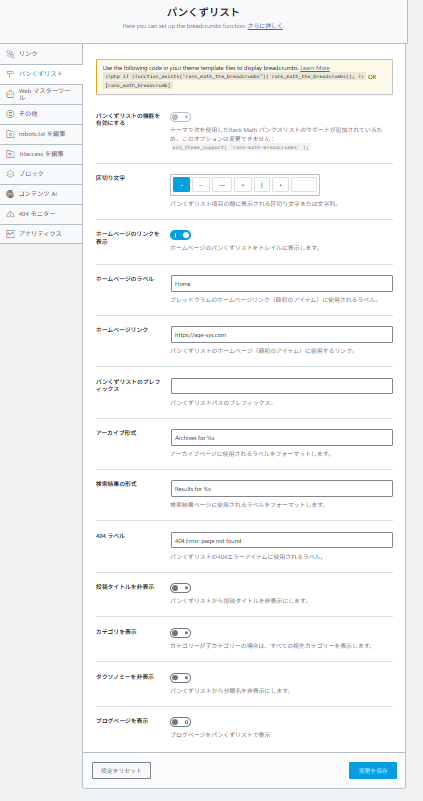
Breadcrumb navigation feature
When you enable the breadcrumb navigation feature, your current location on the site will be displayed as follows:
example:Home > Categories > Article Titles
This allows users to intuitively understand which level they are currently on, leading to improved user engagement and navigation.
Furthermore, since it is reflected as structured data in Google search results, it is also effective for SEO.
Enable breadcrumb navigation
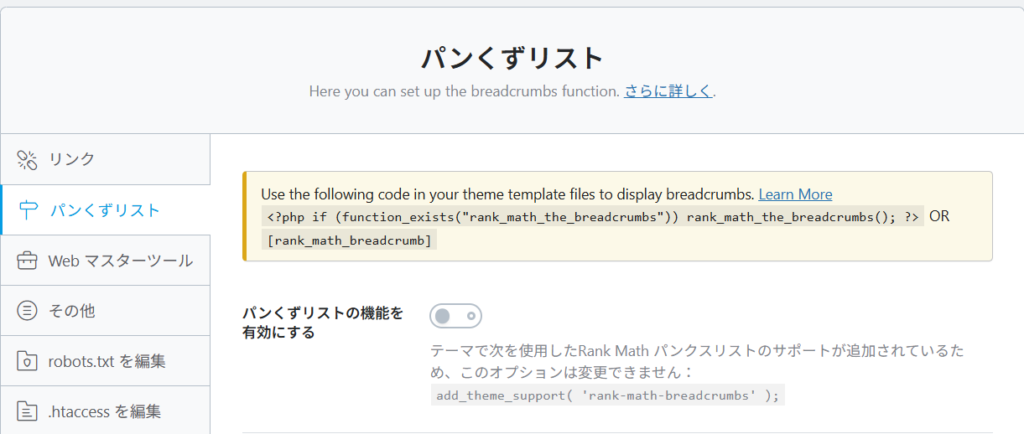
Turning this setting ON will enable RankMath's breadcrumb navigation feature.
However, please note that if breadcrumbs are not implemented in your theme, you will need to add the following code to your template.
<?php if (function_exists('rank_math_the_breadcrumbs')) rank_math_the_breadcrumbs(); ?>
The Blocksy theme we normally use is integrated with RankMath, so no additional settings were required.
Breadcrumb trail points
In most cases, themes display breadcrumbs by default. In that case, you can use the theme's breadcrumbs as they are, but if you want to properly reflect structured data, it's a good idea to rewrite the code using RankMath.
Delimiter

Set the symbols that appear between each item in the breadcrumb trail.
example:
>(general)/-
It's recommended to choose symbols that are easy for users to see.
Displaying links on the homepage

This setting determines whether the homepage (Home) is displayed in the breadcrumb trail.
Basically, "ON is recommended."
This improves usability because users can quickly return to the top of the page.
Homepage labels

You can set the name of "Home" that will be displayed in the breadcrumb trail.
example:
- Home (default)
- Homepage
- Home
For Japanese websites, changing it to "Home" or "Top" sounds more natural.
Homepage Link

Specify the URL of your homepage.
It is usually set automatically,
Be sure to check if you have subdirectories or special structures.
Breadcrumb prefix

This is the text that appears before the breadcrumb trail.
example:
- "current location:"
- "You are here:"
Since this field is often unused on recent websites, leaving it blank is not a problem.
Archive format

Configure the display format for category and date archive pages.
example:
- Archives for %s
For the Japanese site, the following changes are recommended:
example:
- "List of %s"
Search result format

Configure the breadcrumb display on the search results page.
example:
- Results for %s
Recommended Japanese:
- "Search results for "%s""
404 Label

This is the text displayed on the 404 error page.
example:
- 404 Error: page not found
Recommended Japanese:
- "Page not found"
Hide post title

This setting hides the "article title" in the breadcrumb trail.
It is generally recommended to keep it OFF.
→ Currently, the page is difficult to understand.
Show categories

This setting determines whether or not to display categories on the post page.
It's important both from an SEO and structural standpoint, so "ON is recommended."
Hide taxonomies

This setting hides custom taxonomies (unique classifications).
Unless you have a special configuration, it's fine to leave it OFF.
View blog page

This setting determines whether or not to include the blog list page in the breadcrumbs.
example:Home > Blog > Articles
If you want to clarify the blog structure, we recommend turning it ON.
summary
RankMath's breadcrumb list settings allow for more than just visual adjustments;
This is an important factor that significantly impacts SEO.
The most important points are as follows:
- Make sure to enable breadcrumbs.
- Turn on category display.
- Optimize for Japanese labels
- Add display code to the theme (if necessary)

We are available on weekends and holidays!
Please contact us if you have any problems with your website!

- Unable to log in to WordPress
Malware infection?
- The homepage suddenly stopped displaying!
- A PHP error is occurring.
We also offer support on weekends and holidays for those who need assistance.
If you are in a hurry, please call us now at 03-6694-7024.
Latest Articles
[Anti-Fraudulent Login Prevention] Is your WordPress user ID visible to external parties? We explain how to check and security measures to hide your user ID!


Timing and Process for Renewing Your Recruitment Website | Key Points to Review to Increase the Number of Applications

7 Key Points for Creating a Recruitment Website | How to Create a Recruitment Site That Job Seekers Will Choose
 English
  日本語
日本語