How to create a website using WordPress/How to use plugins/No-code construction blog



Explains how to use the notification function with the LMS plugin TutorLMS
At HanamiWEB Online School,
●Ask questions in real-time in the virtual study room!
●Ask as many questions as you want via chat!
●E-learning materials that you can learn as much as you want, 24 hours a day!
All included for just 2,500 yen/month!
I am researching LMS plugins to create an e-learning system using WordPress. I am introducing the paid version of the TutorLMS plugin. Since I want to create a full-fledged system, I am comparing the features of the paid version.
This time, we will explain how to set up extension notifications for the paid version of TutorLMS.
Notifications Extension
- TutorLMS
- Add-ons
- Notification
Turn it ON.
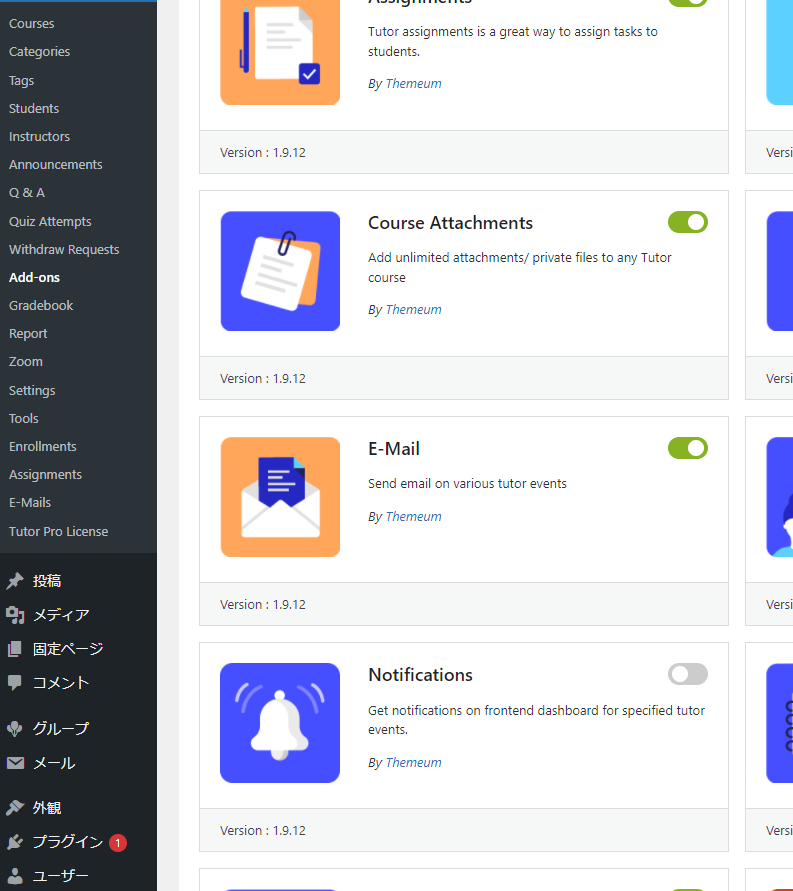
Notification settings
- TurorLMS
- Settings
- Notifications
and set it up.
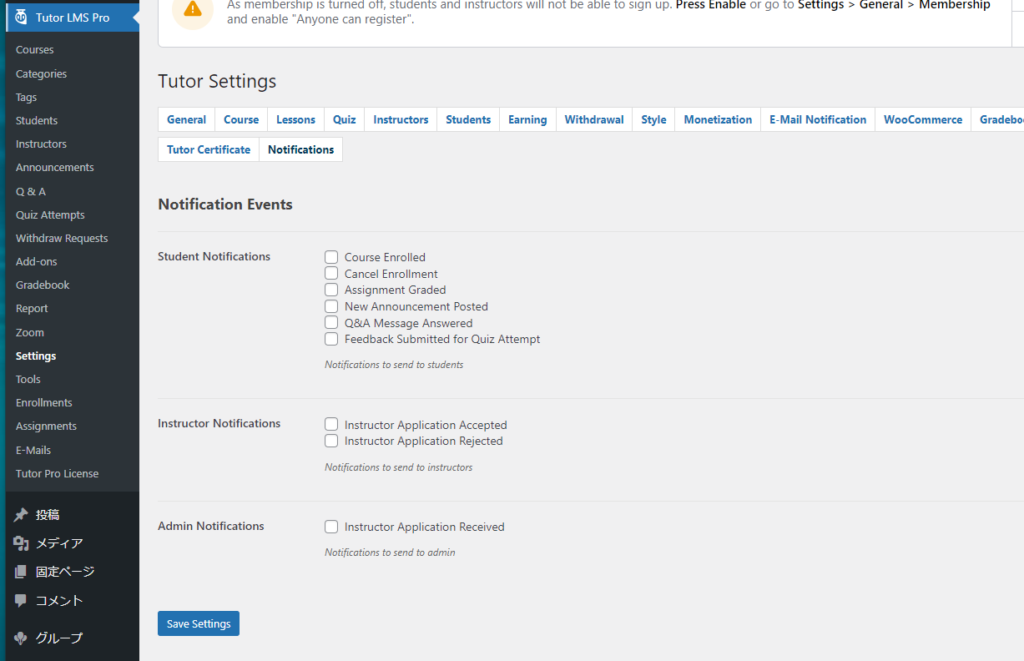
The items that can be set are
User notification settings
- Course Enrolled - when you are added to a course
- Cancel Enrollment - When you cancel a course
- Assignment Graded - When a grade is assigned
- New Announcement Posted – When a new announcement is added
- Q&A Message Answered - When a Q&A has been replied to
- Feedback Submitted for Quiz Attempt - When feedback is given to a quiz
Instructor Notification Settings
- Instructor Application Accepted - When your instructor application is complete
- Instructor Application Rejected - When your instructor application is rejected
Administrator Notification
- Instructor Application Received - When an application for an instructor has been received

We are available on weekends and holidays!
Please contact us if you have any problems with your website!

- Unable to log in to WordPress
Malware infection?
- The homepage suddenly stopped displaying!
- A PHP error is occurring.
We also offer support on weekends and holidays for those who need assistance.
If you are in a hurry, please call us now at 03-6694-7024.
Latest Articles
[Anti-Fraudulent Login Prevention] Is your WordPress user ID visible to external parties? We explain how to check and security measures to hide your user ID!


Timing and Process for Renewing Your Recruitment Website | Key Points to Review to Increase the Number of Applications

7 Key Points for Creating a Recruitment Website | How to Create a Recruitment Site That Job Seekers Will Choose
 English
  日本語
日本語