How to create a website using WordPress/How to use plugins/No-code construction blog



How to set titles and descriptions in Rank Math | Explanation of templates and individual settings
At HanamiWEB Online School,
●Ask questions in real-time in the virtual study room!
●Ask as many questions as you want via chat!
●E-learning materials that you can learn as much as you want, 24 hours a day!
All included for just 2,500 yen/month!
This section compiles articles detailing HanamiWEB's actual experiences with SEO design in the AI era, RankMath settings, and structured data implementation.
Setting the title and description is extremely important for SEO and AI search optimization.
These two pieces of information displayed in search results significantly impact click-through rates and ratings.
This article explains how to set titles and descriptions using Rank Math, divided into "template settings" and "individual settings."
What are titles and descriptions?
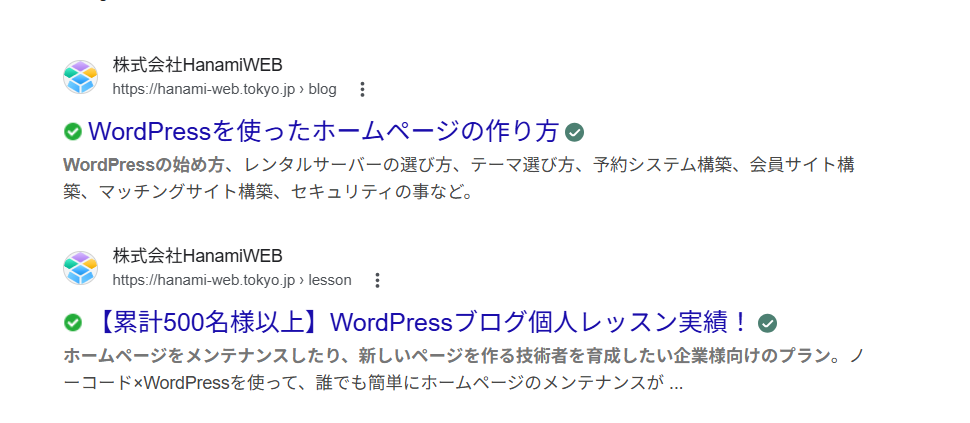
The title is the heading displayed in the search results, and the description is the explanatory text.
This is a crucial factor in determining whether a user will click on a page, and it is used not only in SEO but also in AI search as information to understand the page content.
This refers to the title and description that appear in search engine results.
Basic template settings (applicable to all pages)
First, set up a template that applies to all pages.
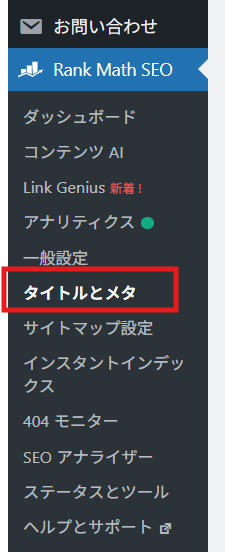
Location
WordPress admin screen
→ Rank Math
→ Title and Meta
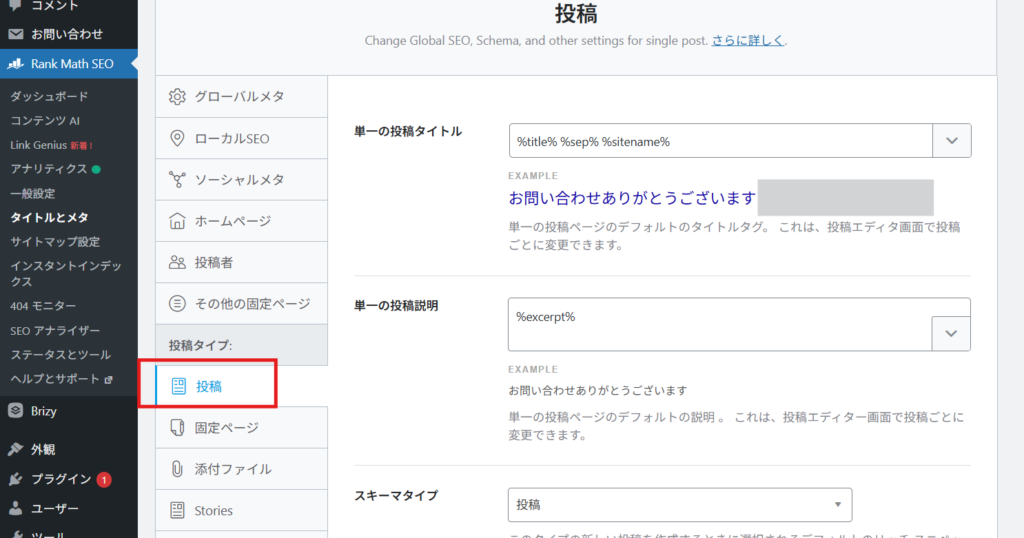
Post page settings
Single post title
This is the title setting for your blog post.
%title%%sep% %sitename%
- %title% - The page title will be automatically entered.
- %sep% - A separator line "|" will be automatically inserted.
- %sitename% - The site name set in Settings > General will be automatically entered. If you want to include a place name or other information, you can add it by adding text.
Single post description
%excerpt%
The excerpts are automatically reflected, but initially, you will manually enter the compiled text page by page.
Schema type
Posting is fine.
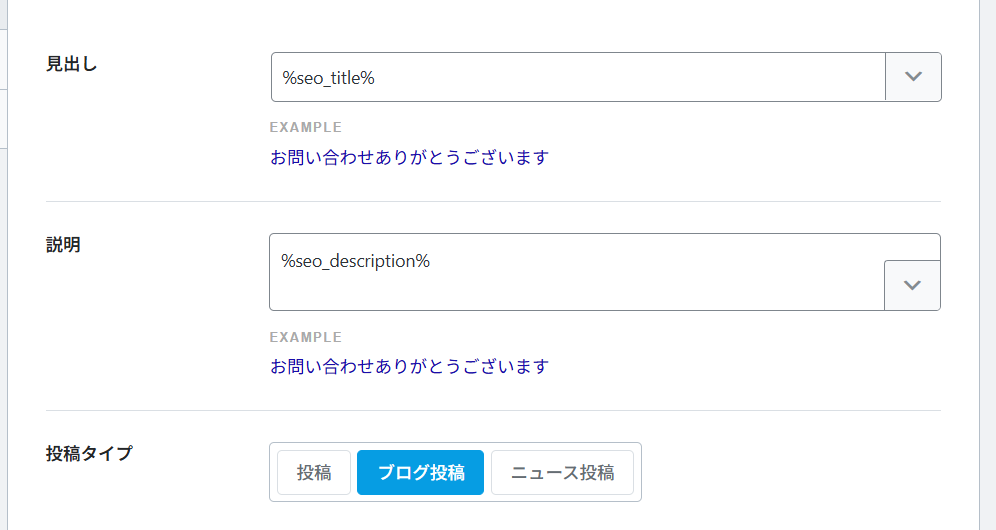
Headline
explanation
Post Types
A blog post is fine.
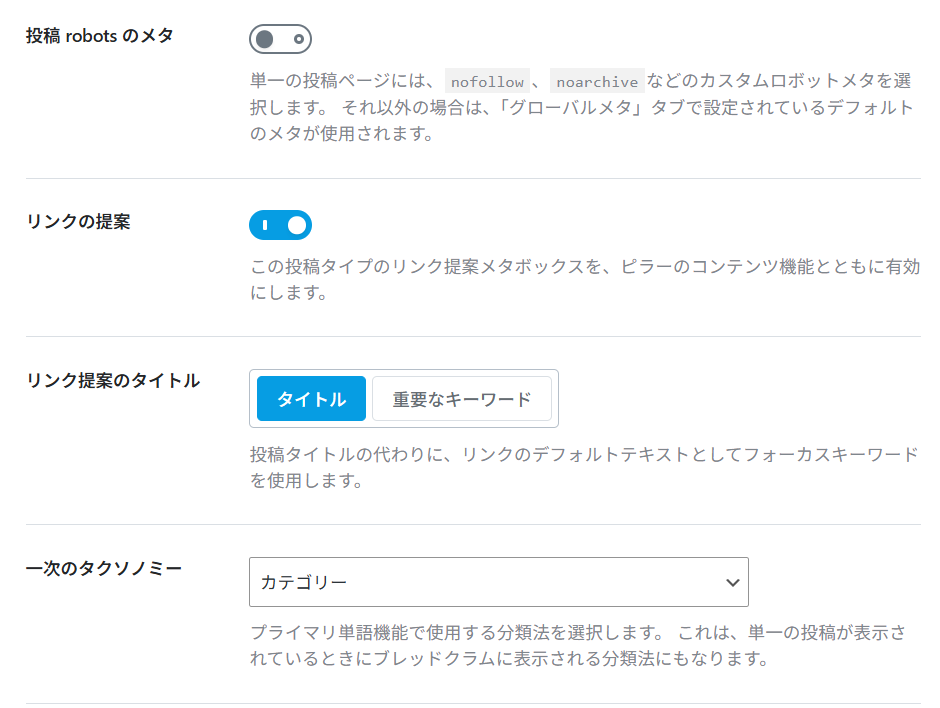
Meta for posts by robots
This section allows you to set robot meta tags (instructions for search engines) that are applied to each post page.
The following settings are available here:
- noindex (do not display in search results)
- nofollow (does not pass on link evaluation)
- noarchive (do not save cache)
Regular blogs and article pages need to be displayed in search results,
You can leave this setting turned off.
It is recommended to configure settings individually only for pages with special reasons (such as pages that are almost private).
Link suggestion
This setting displays the "Internal Link Suggestion" feature on the post editing screen.
When enabled, this feature displays suggested links to relevant pages when you create an article, making it easier to design internal links.
Internal links are a very important element in SEO.
It plays a role in appropriately distributing ratings within the site.
It's generally recommended to leave it turned on.
Link suggestion title
You can choose the criteria for setting the anchor text (link text) of internal links.
title
The post title will be used directly as the link text.
Important Keywords
The set focus keyword will be used as the link text.
For beginners, "Title" is perfectly fine.
Once you're more comfortable, you can consider using keywords with SEO in mind.
The next taxonomy
If a post has multiple categories,
This setting determines which category will be treated as the "main" category.
The categories set here will affect the following:
- Displaying breadcrumb trails
- Structural recognition for search engines
- URL design (depending on the theme)
Usually, selecting "Category" is sufficient.
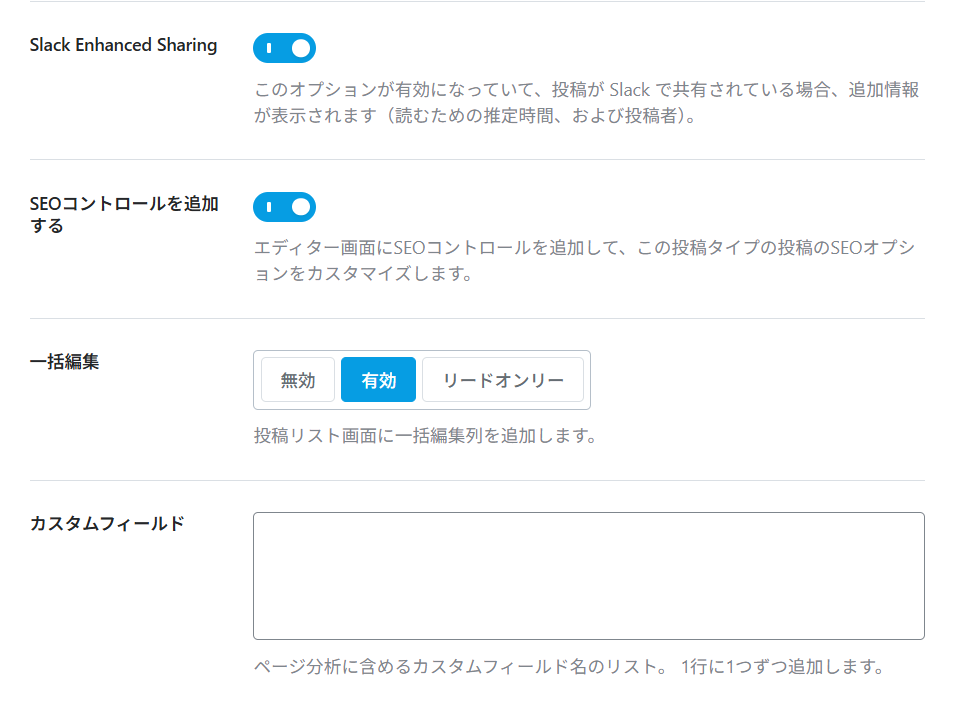
Slack Enhanced Sharing
This feature displays additional information (such as estimated reading time and author information) when a post is shared on Slack.
This feature is primarily useful for internal company and team information sharing, and if you're using Slack, enabling it will increase the amount of information you can view.
While not essential for general website operation, it's fine to leave it enabled unless there are specific issues.
Add SEO controls
This feature displays Rank Math's SEO settings options on the editing screen for posts and pages.
Enabling this will allow you to configure the following settings for each page.
- Setting the title and description
- Schema settings
- Control such as noindex
This is an essential function for SEO, so we generally recommend keeping it enabled.
Batch editing
This feature allows you to edit SEO information such as titles and descriptions all at once from the post list screen.
As the number of articles increases, it becomes possible to efficiently review SEO settings, making it extremely convenient for operational purposes.
It's generally recommended to leave it enabled.
Custom Fields
This setting allows you to specify the custom fields to include in page analysis.
If you are using custom fields with a specific theme or plugin, you can incorporate their contents into your SEO analysis.
For typical website operation, no special settings are required, so you can leave this field blank.
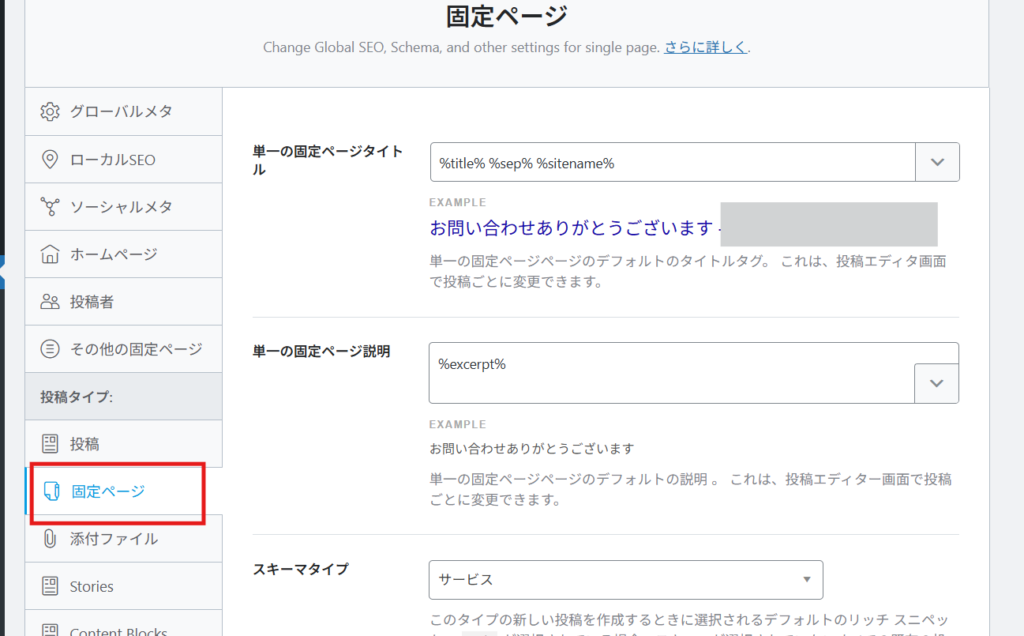
Page settings
Static pages are configured in the same way as blog posts.
How to fix it individually (important)
The template is merely a base.
Be sure to configure settings individually for important pages.
Setup Procedure
- Open a post or page
- Display the settings section for Rank Math.
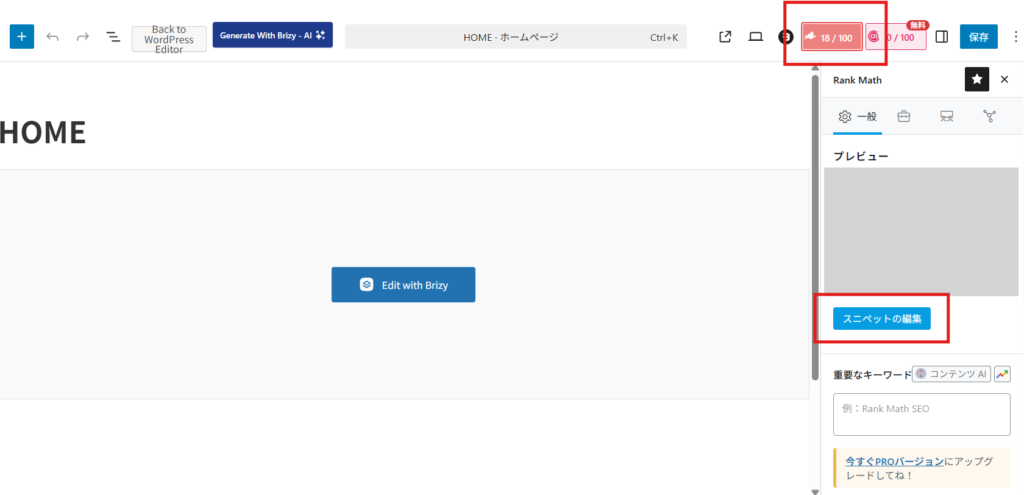
- Click "Edit Snippet"
- Enter the title and description.
The settings options are located to the right of the [Save] button on each page.
Please click on the area highlighted in red.
Open the editing screen from the snippet editor.
I will change the title and description.
It's a good idea to have AI generate the explanatory text.
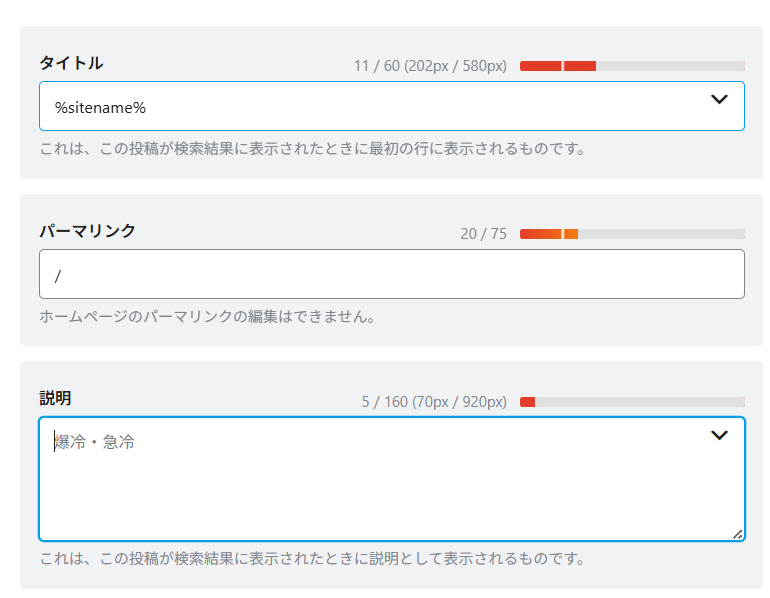
point
- Include keywords
- Summarize the content concisely.
- Create it in approximately 120 characters.
- Write about the benefits for the user.
Common mistakes
- Leave it as a template.
- Keywords are not included
- It's too long and gets cut off midway.
- All pages have the same content.
summary
Rank Math allows you to efficiently manage titles and descriptions.
The following two points are important:
- Use a template to organize the whole thing.
- Optimize important pages individually.
By keeping these two things in mind, you can create a website that is strong in both SEO and AI search.

We are available on weekends and holidays!
Please contact us if you have any problems with your website!

- Unable to log in to WordPress
Malware infection?
- The homepage suddenly stopped displaying!
- A PHP error is occurring.
We also offer support on weekends and holidays for those who need assistance.
If you are in a hurry, please call us now at 03-6694-7024.
Latest Articles
[Anti-Fraudulent Login Prevention] Is your WordPress user ID visible to external parties? We explain how to check and security measures to hide your user ID!


Timing and Process for Renewing Your Recruitment Website | Key Points to Review to Increase the Number of Applications

7 Key Points for Creating a Recruitment Website | How to Create a Recruitment Site That Job Seekers Will Choose
 English
  日本語
日本語